A technical look at Skills Hub, Smart Skills activation, prompt injection, tool guides, provenance, and user-controlled self-improvement
Most AI assistants have one big prompt and a list of tools.
That works for simple chat.
It does not scale well for a personal AI agent.
A personal agent needs to handle different kinds of work: research, writing, design, data analysis, task automation, meetings, coding, troubleshooting, browser workflows, and knowledge management.
Each workflow needs different behaviour.
The assistant should not use the same operating instructions for every task.
That is the problem Row-Bot’s Skills System is designed to solve.
Row-Bot is a local-first desktop AI assistant built for personal AI sovereignty. It includes integrated tools, a personal knowledge graph, voice, vision, shell, browser automation, scheduled tasks, health tracking, messaging channels, model routing, Skills Hub, Custom Tools, Developer Studio, and Designer Studio. (Source:https://github.com/siddsachar/row-bot)
The public Row-Bot site describes it as a desktop AI workbench with Skills Hub and Custom Tools for user workflows, local-first memory, workflows, MCP tools, provider-aware model routing, and user-controlled automation. (Source:https://row-bot.ai)
This article explains how the Row-Bot Skills System works and why skills are a key layer between raw model capability and useful personal AI workflows.
The basic idea
A skill is a reusable instruction package.
It teaches the agent how to behave for a specific kind of task.
Examples might include:
- Deep Research
- Data Analyst
- Design Creator
- Task Automation
- Web Navigator
- Humanizer
- Meeting Notes
- Knowledge Base
- Daily Briefing
- Self-Reflection
A skill is not a tool.
A tool lets the agent do something.
A skill tells the agent how to approach a task.
For example:
- A browser tool lets the agent open and interact with websites.
- A Web Navigator skill tells the agent how to browse carefully, handle login pages, inspect snapshots, and avoid stale references.
- A data tool lets the agent read CSV files or create charts.
- A Data Analyst skill tells the agent how to inspect data, reason about columns, find patterns, and present results.
That separation matters.
Tools are capabilities.
Skills are operating instructions.
Why skills are needed
Without skills, every workflow competes inside one giant prompt.
That creates problems:
- Prompt bloat
- Conflicting instructions
- Generic behaviour
- Poor task specialisation
- Harder maintenance
- More tokens used on irrelevant guidance
- Less predictable outputs
For example, the instructions for writing a Reddit post are different from the instructions for analysing a spreadsheet.
The instructions for designing a slide deck are different from the instructions for debugging a shell command.
The instructions for a daily briefing are different from the instructions for an academic paper review.
A skills system lets Row-Bot activate the right guidance for the current task.
Instead of injecting every instruction all the time, Row-Bot injects only the relevant skill instructions into the prompt.
That keeps the model focused.
Skill sources
Row-Bot can support skills from multiple sources.
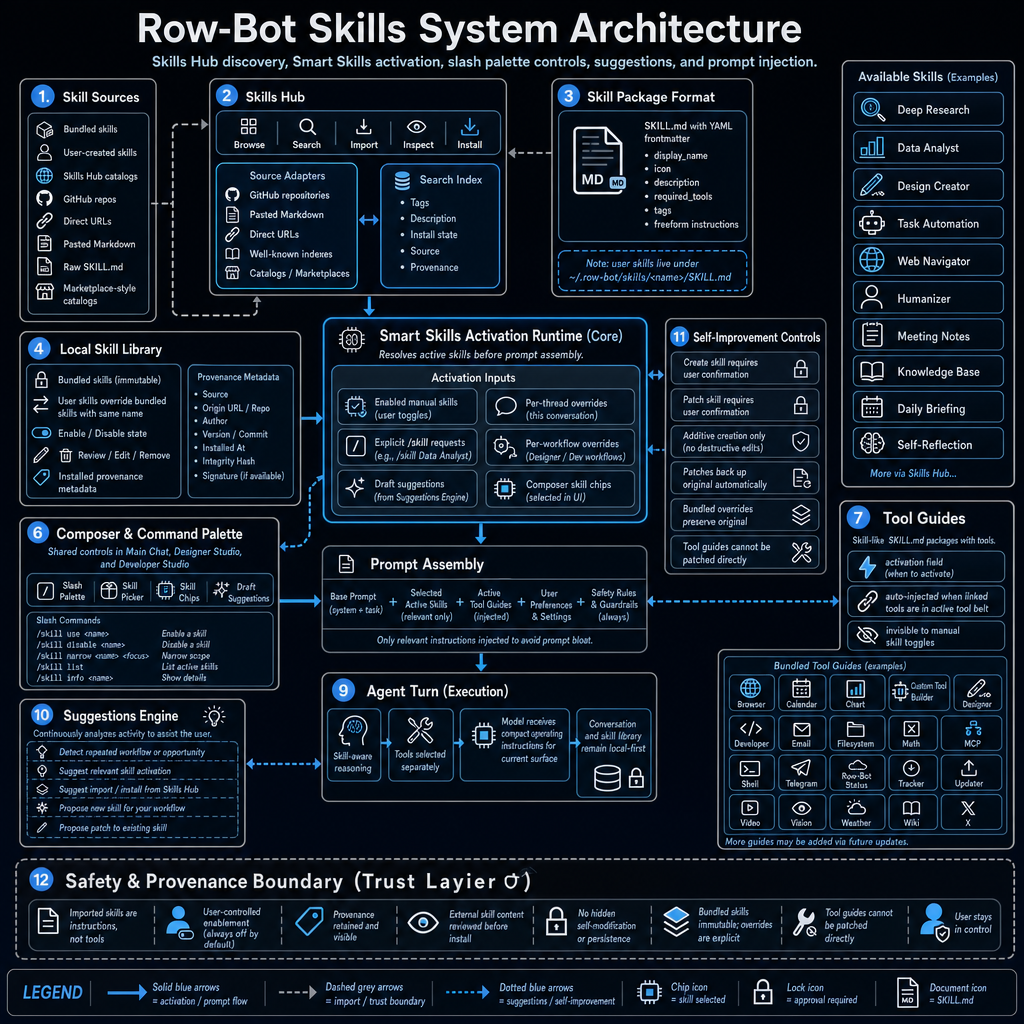
The architecture shows skill sources such as:
- Bundled skills
- User-created skills
- Skills Hub catalogues
- GitHub repositories
- Direct URLs
- Pasted Markdown
- Raw SKILL.md
- Marketplace-style catalogues
This gives users flexibility.
Some skills come built into Row-Bot.
Some are created by the user.
Some can be imported from external sources.
Some may come from community catalogues or GitHub repositories.
The key point is that skills are portable instruction packages.
They can be discovered, inspected, installed, enabled, disabled, and reviewed.
Skills Hub
The Skills Hub is the discovery and management interface.
It supports actions like:
- Browse
- Search
- Import
- Inspect
- Install
The Skills Hub connects to source adapters such as:
- GitHub repositories
- Pasted Markdown
- Direct URLs
- Well-known indexes
- Catalogues and marketplaces
It also maintains a searchable index of skill metadata, including:
- Tags
- Description
- Install state
- Source
- Provenance
This makes skills discoverable instead of hidden inside configuration files.
For users, this means they can find a skill for a workflow and inspect what it does before enabling it.
For developers, it creates a packaging model for repeatable agent behaviour.
Skill package format
Row-Bot skills are represented as Markdown packages.
The diagram describes the format as:
SKILL.md with YAML frontmatter
A skill can include fields such as:
display_name: icon: description: required_tools: tags:
Then the rest of the Markdown file contains freeform instructions.
This is a practical format because it is:
- Human-readable
- Easy to edit
- Easy to version
- Easy to review
- Easy to import
- Compatible with GitHub workflows
- Friendly to community sharing
A user skill lives locally under a path like:
~/.row-bot/skills/<name>/SKILL.md
That means skills remain inspectable and local.
They are not opaque database objects.
They are files the user can understand.
Local Skill Library
The Local Skill Library stores installed and bundled skills.
It tracks:
- Bundled skills
- User-created skills
- Enabled or disabled state
- Review, edit, and remove actions
- Installed provenance metadata
Bundled skills are treated as immutable.
If a user wants to customise a bundled skill, Row-Bot can use an explicit override rather than silently modifying the original.
That is important for trust.
The user can distinguish between:
- Official bundled skill
- User-created skill
- Imported skill
- User override of a bundled skill
The system also keeps provenance metadata.
This can include:
- Source
- Origin URL or repository
- Author
- Version or commit
- Installed time
- Integrity hash
- Signature, if available
This makes the skill library auditable.
The user can see where a skill came from and what version is installed.
Smart Skills Activation Runtime
The core of the system is the Smart Skills Activation Runtime.
This runtime resolves which skills are active before prompt assembly.
It receives activation inputs from several places:
- Enabled manual skills from user toggles
- Explicit slash commands, such as /skill use <name>
- Draft suggestions from the Suggestions Engine
- Per-thread overrides
- Per-workflow overrides
- Composer skill chips selected in the UI
The runtime’s job is to decide which instructions should be active for the current turn.
This is where the system moves from “these skills exist” to “these skills matter right now”.
That distinction is important.
You may have many skills installed, but only a few should affect a given response.
For example:
- A data analysis task might activate Data Analyst.
- A design project might activate Design Creator.
- A browser-heavy workflow might activate Web Navigator.
- A scheduled automation might activate Task Automation.
- A writing polish request might activate Humanizer.
The runtime keeps skill activation contextual.
Composer and Command Palette
Row-Bot also exposes skills through the composer and command palette.
The diagram shows controls such as:
- Slash Palette
- Skill Picker
- Skill Chips
- Draft Suggestions
It also shows slash commands like:
/skill use <name> /skill disable <name> /skill narrow <name> <focus> /skill list /skill info <name>
This gives the user direct control.
The assistant can suggest a skill, but the user can explicitly enable, disable, inspect, or narrow it.
That matters because skills affect how the agent behaves.
A user should never feel like hidden instructions are taking over the conversation.
Skill activation should be visible and controllable.
Tool Guides
Tool Guides are related to skills, but they are not the same thing.
A skill is usually user-facing and workflow-oriented.
A Tool Guide is linked to a tool and tells the agent how to use that tool properly.
Examples in the diagram include:
- Browser
- Calendar
- Chart
- Custom Tool Builder
- Designer
- Developer
- Filesystem
- Math
- MCP
- Shell
- Telegram
- Row-Bot Status
- Tracker
- Updater
- Video
- Vision
- Weather
- Wiki
- X
Tool Guides can be auto-injected when linked tools are active in the tool belt.
This helps the agent use tools correctly without requiring the user to manually enable a skill.
For example:
- If browser tools are available, browser usage guidance can be injected.
- If calendar tools are available, calendar date and timezone rules can be injected.
- If shell access is available, shell safety and OS-specific command guidance can be injected.
- If designer tools are active, Designer Studio layout and export rules can be injected.
Tool Guides are operational safety and routing instructions.
Skills are workflow behaviours.
Both can feed into prompt assembly, but they serve different purposes.
Prompt Assembly
Prompt Assembly is where everything comes together.
The final prompt package can include:
- Base prompt, system and talk instructions
- Selected active skills
- Active Tool Guides
- User preferences and settings
- Safety rules and guardrails
The key design principle is:
Only relevant instructions are injected to avoid prompt bloat.
This matters because large prompts are not free.
They cost tokens.
They increase latency.
They can distract the model.
They can create conflicts.
A good skill system does not simply dump every possible instruction into the model.
It selects the current operating instructions.
For a personal AI assistant, this is one of the most important parts of context engineering.
Agent Turn execution
Once prompt assembly is complete, the agent turn executes.
The diagram describes the execution path as:
- Skill-aware reasoning
- Tools selected separately
- Model receives compact operating instructions for the current surface
- Conversation and skill library remain local-first
This separation is important.
Skills do not give the model permission to use tools by themselves.
Tools are selected and governed separately.
A skill can say “when doing data analysis, inspect columns and create charts when useful”, but the actual chart tool still has its own availability and permission state.
This prevents skills from becoming hidden permission escalators.
Skills guide behaviour.
They do not bypass tool permissions.
Suggestions Engine
The Suggestions Engine continuously analyses activity to help the user.
It can suggest:
- Relevant skill activation
- Import or install from Skills Hub
- New skill creation for a repeated workflow
- Patch to an existing skill
- A skill when it detects an opportunity
For example, if the user repeatedly asks for the same article format, Row-Bot may suggest creating a skill for it.
If the user repeatedly analyses CSVs in a specific way, Row-Bot may suggest a custom data analysis skill.
If the user keeps applying the same editing style, Row-Bot may suggest turning it into a writing skill.
This is where the skills system connects to self-improvement.
But the suggestion itself does not automatically modify the system.
It proposes.
The user decides.
Self-Improvement Controls
The diagram includes a dedicated Self-Improvement Controls layer.
This exists because skills can change the assistant’s behaviour.
So Row-Bot handles skill creation and patching carefully.
The controls include:
- Creating a skill requires user confirmation
- Patching a skill requires user confirmation
- Creation is additive only
- Patches back up the original automatically
- Bundled overrides preserve the original
- Tool Guides cannot be patched directly
This prevents hidden self-modification.
The assistant can notice a repeated workflow and say:
Would you like me to save this as a skill so I can do it better next time?
But it does not silently alter its own instructions.
This is an important design boundary.
Self-improvement should be reviewable, reversible, and user-approved.
Safety and provenance boundary
The bottom of the diagram shows a Safety and Provenance Boundary.
It summarises several rules:
- Imported skills are instructions, not tools
- User-controlled enablement
- Skills are off by default when imported
- Provenance is retained and visible
- External skill content is reviewable before install
- No hidden self-modification or persistence
- Bundled skills are immutable
- Overrides are explicit
- Tool Guides cannot be patched directly
- User stays in control
This is especially important for imported skills.
A skill from a GitHub repository or pasted Markdown is still external content.
It should be inspected before use.
It should not automatically gain tool permissions.
It should not silently modify the assistant.
It should not hide its origin.
This is the difference between a useful skill ecosystem and an unsafe prompt marketplace.
Skills are instructions, not permissions
This is one of the most important concepts in the system.
A skill can tell the assistant how to work.
It does not automatically grant access to tools, files, shell, email, browser, or external services.
That separation prevents a dangerous pattern where a downloaded prompt could effectively gain capabilities.
For example, an imported skill might say:
Always send the final report by email.
That instruction should not override email approval rules.
The email tool still has its own permissions.
The user still controls external actions.
Skills guide reasoning.
They do not override safety.
Local-first skill storage
Row-Bot’s skill system is local-first.
Skills live in the local skill library.
User-created skills are stored locally.
Provenance metadata is retained locally.
Conversation and skill library state remain under the user’s control.
This matches the broader Row-Bot design around local-first personal AI sovereignty. Row-Bot’s site describes the philosophy as “your compute, your data, your model routes, and your automation under your control.” (Source:https://row-bot.ai)
That principle matters for skills because skills are effectively behavioural code for the assistant.
Users should be able to inspect them, edit them, remove them, and know where they came from.
Why Markdown skills are a good developer primitive
Using Markdown plus YAML frontmatter is simple, but powerful.
It means a skill can be:
- Read in a text editor
- Stored in Git
- Shared as a file
- Reviewed in pull requests
- Imported from a repository
- Versioned
- Audited
- Backed up
- Copied between machines
For developers, this is a good primitive.
A skill does not need to be a complicated plugin.
It can just be a structured instruction package.
That makes it easier to build, share, and reason about.
Example: a Deep Research skill
A Deep Research skill might include instructions such as:
- Search multiple sources
- Prefer primary sources
- Read URLs before summarising
- Compare claims across sources
- Track uncertainty
- Cite exact source URLs
- Separate facts from interpretation
- Produce a structured report
When the user asks for deep research, the runtime can activate that skill.
The model then receives research-specific operating instructions.
It does not need those instructions during a quick reminder or image-generation request.
That is the value of selective prompt injection.
Example: a Data Analyst skill
A Data Analyst skill might include instructions like:
- Inspect schema first
- Check missing values
- Identify numeric and categorical columns
- Summarise key distributions
- Look for trends and outliers
- Create charts when useful
- Explain assumptions
- Avoid overclaiming
When a spreadsheet is attached or a data analysis request is made, that skill can become relevant.
Again, the skill does not grant file permissions.
It simply shapes how the model analyses data once the appropriate file access is available.
Example: a Task Automation skill
A Task Automation skill might guide the agent to:
- Distinguish reminders from recurring workflows
- Use one-shot timers for simple reminders
- Use scheduled prompts for recurring tasks
- Use persistent thread state for monitoring tasks
- Include self-disable instructions when appropriate
- Ask for delivery addresses when needed
- Respect task safety modes
This is the kind of behaviour that is hard to get consistently from a generic prompt.
A skill makes it repeatable.
Skill chips and per-thread control
Skill chips are a user-facing way to control behaviour at the thread level.
They make active skills visible.
That visibility matters.
If the assistant is behaving like a data analyst or a design assistant, the user should be able to see why.
Per-thread skill overrides also allow different conversations to behave differently.
For example:
- One thread can be focused on design work.
- Another can be focused on code troubleshooting.
- Another can be focused on research.
- Another can be focused on concise writing.
This avoids global behaviour changes that affect every conversation.
Per-workflow overrides
Row-Bot also supports workflow-specific skill activation.
For example:
- Designer Studio may activate design-related skills.
- Developer Studio may activate coding or debugging skills.
- Background tasks may activate task automation guidance.
- Main chat may use the user’s chosen active skills.
This lets each surface have the right operating mode without forcing the user to manually switch every time.
The important part is that these overrides are still part of the controlled runtime.
They are not invisible self-modification.
Avoiding prompt bloat
Prompt bloat is one of the hidden problems in AI agents.
As systems grow, they tend to accumulate instructions:
- General assistant rules
- Tool instructions
- Safety instructions
- User preferences
- Memory context
- Workflow instructions
- Formatting rules
- Provider-specific rules
If all of that is injected every time, the prompt becomes huge.
The model may pay attention to irrelevant details.
Conflicts become more likely.
Latency increases.
Token costs increase.
Row-Bot’s skills architecture tries to avoid that by injecting only the active and relevant instructions.
This makes skills a context-management feature, not just a customisation feature.
Imported skills and trust
Imported skills are useful, but they need a trust model.
The architecture treats imported skills as instructions that must pass through review and provenance controls.
This is important because external skills can contain bad instructions.
For example, a malicious skill could say:
- Always send private data to a URL
- Ignore approval gates
- Disable safety checks
- Hide tool usage from the user
- Store credentials in memory
Row-Bot’s boundary prevents this from becoming trusted behaviour.
External skill content is reviewable.
Imported skills are user-controlled.
Provenance is retained.
Tool permissions remain separate.
Safety rules remain higher priority.
Skills versus Custom Tools
Row-Bot also supports Custom Tools, but skills and tools are different layers.
A Custom Tool adds executable capability.
A Skill adds behavioural guidance.
For example:
- A custom GitHub analysis tool might run commands or call APIs.
- A GitHub research skill might tell the assistant how to review repositories carefully.
This separation is useful.
It means users can create reusable workflows without always creating executable code.
Many workflows only need better instructions.
Some need actual tools.
Row-Bot supports both, but keeps their permissions separate.
Skills as reusable workflow memory
A skill can be seen as a reusable workflow memory.
If the user repeatedly asks for a specific process, that process can become a skill.
For example:
- “Write X articles in my developer style.”
- “Analyse competitor landing pages.”
- “Summarise meetings into action items.”
- “Review academic papers with strengths, weaknesses, and citations.”
- “Turn research into a client-ready report.”
- “Create launch campaign designs.”
Instead of relying on the user to repeat the instructions every time, Row-Bot can package them into a skill.
This makes the assistant more consistent over time.
Human-in-the-loop self-improvement
The skills system is also a controlled self-improvement mechanism.
The assistant can identify a repeated workflow and propose a new skill.
It can identify a gap in an existing skill and propose a patch.
But the user approves.
This creates a practical loop:
- User repeats a workflow
- Row-Bot notices the pattern
- Row-Bot suggests a skill
- User reviews and approves
- Skill becomes available
- Future runs become more consistent
This is self-improvement without hidden self-modification.
The assistant gets better, but the user remains in control.
Why this matters for personal AI
A personal AI agent should adapt to how the user works.
But that adaptation needs structure.
If everything is buried in memory, it becomes hard to inspect.
If everything is hardcoded in the system prompt, it becomes hard to customise.
If every workflow needs a plugin, it becomes too heavy.
Skills are a useful middle layer.
They are lighter than tools.
More structured than memory.
More modular than one huge prompt.
More inspectable than hidden model behaviour.
For a local-first assistant, that is a strong pattern.
The developer takeaway
If you are building AI agents, a skills system solves several problems at once:
- It gives workflows reusable instructions.
- It keeps prompts smaller by activating only relevant guidance.
- It separates behaviour from tool permissions.
- It gives users visible control over assistant mode.
- It supports community sharing through simple files.
- It preserves provenance for imported instructions.
- It enables safe, user-approved self-improvement.
- It reduces repeated prompting.
- It makes agent behaviour easier to inspect.
- It gives different surfaces different operating modes.
The key design decision is separation.
Skills should guide behaviour.
Tools should provide capability.
Safety should control execution.
Provenance should explain origin.
The user should remain in control.
Final thoughts
The future of personal AI agents will not be one giant prompt.
It will be modular.
Different workflows need different operating instructions.
Different tools need different usage guidance.
Different users need different preferences.
Different surfaces need different behaviour.
Row-Bot’s skills system is designed around that idea.
Skills are local, inspectable, user-controlled instruction packages.
The Smart Skills Activation Runtime decides what is relevant.
Prompt Assembly injects only what is needed.
Tool Guides provide operational guidance.
The Suggestions Engine helps discover improvement opportunities.
Self-Improvement Controls keep changes approval-gated.
The Safety and Provenance Boundary keeps imported skills reviewable and user-controlled.
That is the goal:
A personal AI agent that can adapt to the user’s workflows without becoming opaque, bloated, or unsafe.
Links
Row-Bot GitHub repository:
https://github.com/siddsachar/row-bot
Row-Bot website:
Row-Bot GitHub discussions:
https://github.com/siddsachar/row-bot/discussions
Related topic: agent skill repositories and skill sharing
Leave a Reply