
I have started building a completely local, privacy‑first AI assistant: a multimodal system that combines retrieval‑augmented generation (RAG) and tool calling powered by local LLMs. I chose a model‑agnostic framework—LangChain—to keep the architecture flexible and to make it easy to swap or compare models. My first step was to learn LangChain and LangGraph deeply so I could design composable chains, robust stateful workflows, and safe agent orchestration for on‑device inference.
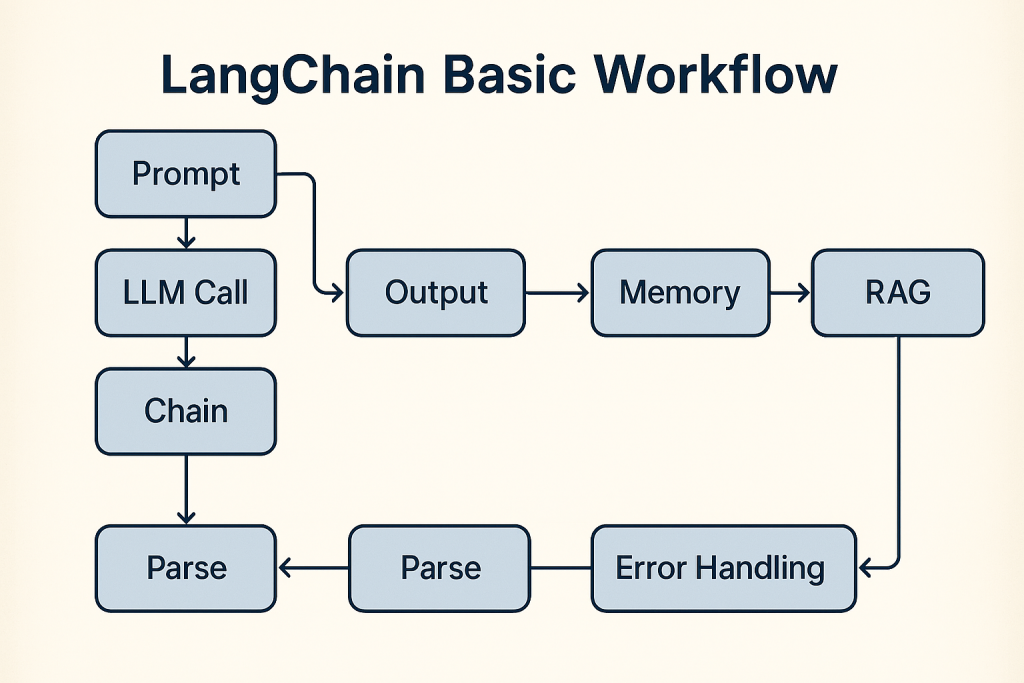
This blog is part 1 of that journey: design decisions, engineering tradeoffs, debugging notes, and operational patterns for building secure, testable, and extensible local AI assistants. Follow along, reproduce the examples from the public GitHub repo, and contribute your improvements so we can build better privacy‑first AI tooling together.
LangChain Basic Workflow Technical Deep Dive
This post is a technical walkthrough of the LangChain Basic Workflow notebook and companion repository. It translates the notebook’s narrative into a structured, engineering‑focused guide that explains each step, the rationale behind it, and the practical considerations you should apply when you run the code in the public GitHub repository.
Overview
The tutorial is an end‑to‑end exploration of building LLM applications with LangChain and LangGraph, emphasizing both cloud and local model workflows. It covers:
- LLM invocation patterns for synchronous chat and single‑turn prompts.
- Deterministic testing using fake LLMs for reproducible unit tests.
- Prompt engineering and prompt templates for consistent behavior.
- Chain composition using LangChain Expression Language (LCEL).
- Output parsing with typed schemas and validation.
- Stateful multi‑agent orchestration with LangGraph.
- Multi‑modal processing for images and video.
- Memory and session management for chat applications.
- Resilience patterns including retries, fallbacks, and observability.
The notebook is organized as a sequence of cells that progressively build from simple examples to production‑grade patterns. Each cell demonstrates a concept, shows expected outputs, and includes notes on usage and failure modes.
github repo
The full notebook with all the steps, is available here:
LangChain-BasicWorkflow
Clone the repo, open the Jupyter notebook, and step through the code.
Environment and Configuration
System requirements
- Python 3.8 or higher. The notebook assumes a modern Python runtime and common developer tooling such as Jupyter or VS Code with the Jupyter extension.
- Optional local runtime: Ollama is recommended for local inference and cost‑effective iteration.
Dependencies and packages
- Core libraries include LangChain, LangGraph, Pydantic, OpenCV, Pillow, and community connectors. The repository lists the required packages and suggests installing them into a virtual environment to avoid dependency conflicts.
Secrets and keys
- The repository provides a
keys.example.pytemplate. Best practice: copy to a localkeys.pyor set environment variables, and never commit secrets to version control. For production, use a secrets manager and restrict access.
Local model setup
- If you plan to use Ollama or other local models, install and run the local server, then pull the desired model artifacts. Local models are useful for prompt iteration, deterministic testing, and cost control.
Notebook Step by Step Walkthrough
Cell: Initialize keys and call the OpenAI LLM
Purpose
- Initialize credentials, construct the OpenAI client (langchain_openai wrapper) and run a synchronous model invocation to get an explanatory response.
Prerequisites
- Imports are in the next cell:
from keys import set_keysandfrom langchain_openai import OpenAI. keys.set_keys()must securely load/set the OpenAI API key (e.g., environment variable or secrets store).- Network access and a valid API key are required.
Line-by-line explanation
set_keys()— loads the API key into the environment or library config; must be called before creating the client.openai = OpenAI()— creates a synchronous OpenAI client wrapper (stores underlying client and credentials).response = openai.invoke("What is Agentic AI?")— sends the prompt to the model and returns a string response.print(response)— prints the model output to the notebook stdout.
Outputs and variables
openai— instance oflangchain_openai.llms.base.OpenAI(client + config).response—strcontaining the model’s answer (printed and available for further processing).
from keys import set_keys
from langchain_openai import OpenAI
d:\Code\LangChain-BasicWorkflow\.venv\Lib\site-packages\langchain_core\_api\deprecation.py:26: UserWarning: Core Pydantic V1 functionality isn't compatible with Python 3.14 or greater.
  from pydantic.v1.fields import FieldInfo as FieldInfoV1
set_keys()
openai = OpenAI()
response = openai.invoke("What is Agentic AI?")
print(response)
Agentic AI (Artificial Intelligence) refers to the ability of AI systems to act autonomously, make decisions, and perform tasks without human intervention. This type of AI is designed to mimic human agency, or the ability to think and act independently, in order to achieve specific goals or solve problems. Agentic AI is often used in fields such as robotics, autonomous vehicles, and smart home devices, and is constantly evolving to become more sophisticated and efficient.
Cell: Demo — FakeListLLM deterministic response
Purpose
- Demonstrate using langchain_community.llms.FakeListLLM to produce a deterministic, canned response for testing or demos.
Prerequisites
- The class is available via: from langchain_community.llms import FakeListLLM
- No network or API key is required.
What the code does
- Instantiates a FakeListLLM with a list of predefined responses.
- Invokes the LLM with a prompt (“Hello”) and prints the next canned response.
Line-by-line explanation
- fake_llm = FakeListLLM(responses = [“Hello! This is a fake test response.”])
- Creates a fake LLM that returns responses in the order provided.
- response = fake_llm.invoke(“Hello”)
- Sends the prompt to the fake LLM; returns the next canned response as a str.
- print(response)
- Writes the returned string to stdout.
Outputs and variables
- fake_llm: FakeListLLM instance containing the provided responses.
- response: str containing the returned canned response (expected: “Hello! This is a fake test response.”).
Usage notes
- Useful for unit tests, UI prototypes, and examples where predictable outputs are required.
- Each invoke() call consumes one response from the list; reinstantiate or provide multiple responses for repeated calls.
from langchain_community.llms import FakeListLLM

fake_llm = FakeListLLM(responses = ["Hello! This is a fake test response."])
response = fake_llm.invoke("Hello")
print(response)
Hello! This is a fake test response.
Cell: Sync chat invocation with ChatOpenAI
Purpose
- Perform a synchronous chat-style invocation against the ChatOpenAI client (gpt-5) with a SystemMessage that enforces a response-style constraint and a HumanMessage prompt asking about Agentic AI and deployment strategy.
- Print both the message content (human-consumable text) and the full underlying response object (metadata, usage, tool calls).
Prerequisites
- The following classes/objects must already be available in the notebook (imports and instantiation happen in other cells):
- ChatOpenAI (langchain_openai.chat_models.base.ChatOpenAI)
- SystemMessage (langchain_core.messages.system.SystemMessage)
- HumanMessage (langchain_core.messages.human.HumanMessage)
What this cell does
- Constructs a system message that sets the assistant persona and enforces that it “always end the response with a joke.”
- Constructs a human message asking about “Agentic AI” and an enterprise deployment strategy.
- Calls
chat.invoke(messages)to synchronously get an AIMessage response. - Prints:
- The main textual content of the LLM response (
response.content) for easy reading. - The full response object for inspection of metadata (token usage, model name, tool calls, IDs, finish reason, etc.).
- The main textual content of the LLM response (
Line-by-line explanation
- messages = […]
- Builds a list of two message objects: SystemMessage (assistant role + constraint) and HumanMessage (user prompt).
- response = chat.invoke(messages)
- Sends the messages to the ChatOpenAI client synchronously and returns an AIMessage-like object containing content and metadata.
- print(f”LLM response content: \n {response.content} \n”)
- Prints the human-readable content produced by the model.
- print(f”Full LLM response: \n {response}”)
- Prints the full response object for debugging, auditing, or extracting usage statistics and tool-call details.
Outputs and variables
- messages (list[BaseMessage]) — the list of messages sent to the model.
- response (AIMessage-like) — contains:
- content: str (the model’s generated text)
- additional_kwargs/response_metadata: dict (token usage, model_name, ids, tool calls, etc.)
- other runtime metadata useful for logging, billing, or decision-making.
Usage notes and cautions
- Cost and token usage: synchronous invocations incur token usage; inspect
responsemetadata for cost analysis. - Safety and prompt constraints: the system message enforces a stylistic constraint (append a joke). Adjust system prompts to match policy and safety requirements.
Quick troubleshooting
- If
chat.invokeraises an authentication or network error, verify keys are set and network access is available. - If
response.contentis empty, inspectresponsemetadata for finish_reason and tool_calls to understand termination conditions.
from langchain_openai import ChatOpenAI
from langchain_core.messages import SystemMessage, HumanMessage

chat = ChatOpenAI(model_name = "gpt-5")

messages = [
    SystemMessage(content = "You are a helpful chat assistant that responds to user requests and always end the response with a joke."),
    HumanMessage(content = "What is Agentic AI? Give me a good strategy for deploying it in an enterprise")
]

response = chat.invoke(messages)
print(f"LLM response content: \n {response.content} \n")
print(f"Full LLM response: \n {response}")
LLM response content:
 Agentic AI, in short:
- It’s AI that doesn’t just answer; it decides, plans, and takes actions toward goals via tools/APIs, often in multi-step workflows with memory and feedback.
- Typical capabilities: goal decomposition, tool use (search, RAG, ERP/CRM calls), planning/replanning, monitoring outcomes, and asking for help (human-in-the-loop) when confidence is low.

Where it shines in the enterprise:
- Knowledge work automation: case triage, report generation, RFP/RFI responses, policy Q&A with citations.
- Operations: ticket resolution, order exceptions, inventory checks, incident runbooks.
- Revenue: lead research, outreach drafting, CPQ assistance, customer success summarization.
- IT/data: SQL generation with approval, data quality checks, pipeline runbooks.
- Back-office: HR policy agent, procurement assistant, finance close checklists.

A pragmatic enterprise deployment strategy

1) Align on outcomes and guardrails
- Define top 3 measurable goals (e.g., reduce average handle time 20%, deflect 30% tickets tier-1, cut report prep time 50%).
- Bound autonomy: which actions can the agent take automatically vs. require approval; set max steps, budgets, data scopes.

2) Prioritize use cases
- Start with high-volume, rules-and-docs-heavy, low-regret actions. Avoid first-line net-new creative tasks.
- Score by ROI, technical feasibility (data availability, tool APIs), risk, and change management complexity.

3) Reference architecture (modular, cloud-agnostic)
- Channels: web, Slack/Teams, email.
- Gateway: authn/authz (SSO, SCIM), rate limiting, audit.
- Agent runtime/orchestrator: planning, tool calling, workflow policies, step limits, approval hooks.
- Models: mix of frontier LLMs (for reasoning) and cheaper models (classification/extraction). Use batch/streaming and caching.
- Knowledge layer: RAG with vector index over vetted corpora; document governance and freshness pipeline.
- Tools/connectors: ERP/CRM/ITSM/DBs via allowlisted, least-privilege service accounts; simulation mode for testing.
- Policy/guardrails: content filters, PII redaction, prompt-injection defenses, allow/deny action lists.
- Observability: tracing, token/latency/cost, success metrics, human-override rate, replay.
- Secrets/config: centralized secrets manager, config-as-code; environment promotion (dev/stage/prod).

4) Build vs. buy
- Platform: Azure OpenAI/OpenAI/Anthropic; consider open-source (Llama/Mistral) where data residency or cost demands it.
- Agent frameworks: OpenAI Assistants API, LangChain, Semantic Kernel, LlamaIndex, AutoGen/CrewAI; pick one and standardize patterns.
- Vector stores: Pinecone, pgvector, Weaviate; choose based on scale, ops maturity, and VPC/privacy.
- Buy vertical agents when they exactly match a workflow and let you bring-your-own-guardrails; otherwise build.

5) Safety, risk, and compliance baked in
- Privacy/compliance: data minimization, PII redaction, region pinning, retention limits, DLP. Map to SOC 2/ISO 27001/GDPR/HIPAA as relevant.
- Prompt-injection defenses: contextual retrieval allowlists, content scanning, tool schema validation, constrained decoding for structured outputs.
- Action controls: simulated “dry-run” mode, approval gates for external comms/purchases/changes, timeouts, budgets, kill switch.
- Hallucination control: retrieval-first prompts, cite sources, refusal policies, fallback to “I don’t know,” and confidence/risk routing.

6) Delivery approach
- 0–30 days: readiness and data audit, pick 1–2 use cases, design autonomy boundaries, create golden datasets and eval rubrics, set up sandbox runtime and RAG over a small curated corpus.
- 30–60 days: build MVP with human-in-the-loop, run shadow/pilot with 20–50 users, track precision, time saved, override rate, and user satisfaction. Red-team for safety.
- 60–90 days: harden (observability, drift/eval pipelines, cost controls), expand connectors, move to limited prod with SLAs.

7) LangOps/MLOps for agents
- Version everything: prompts, tools, retrieval indices, policies.
- Automated evals per release: offline golden tasks, adversarial tests, regression checks; online A/B with guardrails.
- Incident response: alerting on failure patterns, rollbacks, replay, postmortems.
- Data/knowledge freshness: scheduled reindexing, doc lifecycle, source ownership.

8) Adoption and change management
- Create an AI Center of Excellence: patterns, checklists, reusable components, and an approvals board for risky actions.
- Train users and managers; publish playbooks and “what the agent can/can’t do.”
- Incentivize feedback loops; add one-click report-a-problem.

9) Cost and performance management
- Use smaller models where possible; distill tasks; response streaming; caching; tool-first design to minimize tokens.
- Quotas per team, budgets per agent, and periodic cost reviews.

Common pitfalls to avoid
- Unbounded autonomy or vague success criteria.
- RAG over messy, stale content; curate and tag sources.
- Skipping evaluations or shipping without human-in-the-loop for high-impact actions.
- Treating agents as chatbots instead of workflow actors with clear SLAs and policies.

Key KPIs
- Task success rate, time-to-resolution, deflection, user CSAT.
- Override/escalation rate, safety incident rate.
- Cost per successful task, tokens per task.
- Freshness of knowledge base, tool error rate.

If you want, I can turn this into a 90-day action plan tailored to your systems and top use cases.

And remember: giving an agent unlimited autonomy is like giving your dog your credit card—sure, it’ll fetch, but you might end up with 200 tennis balls and a robot vacuum named Woof.

Full LLM response:
 content='Agentic AI, in short:\n- It’s AI that doesn’t just answer; it decides, plans, and takes actions toward goals via tools/APIs, often in multi-step workflows with memory and feedback.\n- Typical capabilities: goal decomposition, tool use (search, RAG, ERP/CRM calls), planning/replanning, monitoring outcomes, and asking for help (human-in-the-loop) when confidence is low.\n\nWhere it shines in the enterprise:\n- Knowledge work automation: case triage, report generation, RFP/RFI responses, policy Q&A with citations.\n- Operations: ticket resolution, order exceptions, inventory checks, incident runbooks.\n- Revenue: lead research, outreach drafting, CPQ assistance, customer success summarization.\n- IT/data: SQL generation with approval, data quality checks, pipeline runbooks.\n- Back-office: HR policy agent, procurement assistant, finance close checklists.\n\nA pragmatic enterprise deployment strategy\n\n1) Align on outcomes and guardrails\n- Define top 3 measurable goals (e.g., reduce average handle time 20%, deflect 30% tickets tier-1, cut report prep time 50%).\n- Bound autonomy: which actions can the agent take automatically vs. require approval; set max steps, budgets, data scopes.\n\n2) Prioritize use cases\n- Start with high-volume, rules-and-docs-heavy, low-regret actions. Avoid first-line net-new creative tasks.\n- Score by ROI, technical feasibility (data availability, tool APIs), risk, and change management complexity.\n\n3) Reference architecture (modular, cloud-agnostic)\n- Channels: web, Slack/Teams, email.\n- Gateway: authn/authz (SSO, SCIM), rate limiting, audit.\n- Agent runtime/orchestrator: planning, tool calling, workflow policies, step limits, approval hooks.\n- Models: mix of frontier LLMs (for reasoning) and cheaper models (classification/extraction). Use batch/streaming and caching.\n- Knowledge layer: RAG with vector index over vetted corpora; document governance and freshness pipeline.\n- Tools/connectors: ERP/CRM/ITSM/DBs via allowlisted, least-privilege service accounts; simulation mode for testing.\n- Policy/guardrails: content filters, PII redaction, prompt-injection defenses, allow/deny action lists.\n- Observability: tracing, token/latency/cost, success metrics, human-override rate, replay.\n- Secrets/config: centralized secrets manager, config-as-code; environment promotion (dev/stage/prod).\n\n4) Build vs. buy\n- Platform: Azure OpenAI/OpenAI/Anthropic; consider open-source (Llama/Mistral) where data residency or cost demands it.\n- Agent frameworks: OpenAI Assistants API, LangChain, Semantic Kernel, LlamaIndex, AutoGen/CrewAI; pick one and standardize patterns.\n- Vector stores: Pinecone, pgvector, Weaviate; choose based on scale, ops maturity, and VPC/privacy.\n- Buy vertical agents when they exactly match a workflow and let you bring-your-own-guardrails; otherwise build.\n\n5) Safety, risk, and compliance baked in\n- Privacy/compliance: data minimization, PII redaction, region pinning, retention limits, DLP. Map to SOC 2/ISO 27001/GDPR/HIPAA as relevant.\n- Prompt-injection defenses: contextual retrieval allowlists, content scanning, tool schema validation, constrained decoding for structured outputs.\n- Action controls: simulated “dry-run” mode, approval gates for external comms/purchases/changes, timeouts, budgets, kill switch.\n- Hallucination control: retrieval-first prompts, cite sources, refusal policies, fallback to “I don’t know,” and confidence/risk routing.\n\n6) Delivery approach\n- 0–30 days: readiness and data audit, pick 1–2 use cases, design autonomy boundaries, create golden datasets and eval rubrics, set up sandbox runtime and RAG over a small curated corpus.\n- 30–60 days: build MVP with human-in-the-loop, run shadow/pilot with 20–50 users, track precision, time saved, override rate, and user satisfaction. Red-team for safety.\n- 60–90 days: harden (observability, drift/eval pipelines, cost controls), expand connectors, move to limited prod with SLAs.\n\n7) LangOps/MLOps for agents\n- Version everything: prompts, tools, retrieval indices, policies.\n- Automated evals per release: offline golden tasks, adversarial tests, regression checks; online A/B with guardrails.\n- Incident response: alerting on failure patterns, rollbacks, replay, postmortems.\n- Data/knowledge freshness: scheduled reindexing, doc lifecycle, source ownership.\n\n8) Adoption and change management\n- Create an AI Center of Excellence: patterns, checklists, reusable components, and an approvals board for risky actions.\n- Train users and managers; publish playbooks and “what the agent can/can’t do.”\n- Incentivize feedback loops; add one-click report-a-problem.\n\n9) Cost and performance management\n- Use smaller models where possible; distill tasks; response streaming; caching; tool-first design to minimize tokens.\n- Quotas per team, budgets per agent, and periodic cost reviews.\n\nCommon pitfalls to avoid\n- Unbounded autonomy or vague success criteria.\n- RAG over messy, stale content; curate and tag sources.\n- Skipping evaluations or shipping without human-in-the-loop for high-impact actions.\n- Treating agents as chatbots instead of workflow actors with clear SLAs and policies.\n\nKey KPIs\n- Task success rate, time-to-resolution, deflection, user CSAT.\n- Override/escalation rate, safety incident rate.\n- Cost per successful task, tokens per task.\n- Freshness of knowledge base, tool error rate.\n\nIf you want, I can turn this into a 90-day action plan tailored to your systems and top use cases. \n\nAnd remember: giving an agent unlimited autonomy is like giving your dog your credit card—sure, it’ll fetch, but you might end up with 200 tennis balls and a robot vacuum named Woof.' additional_kwargs={'refusal': None} response_metadata={'token_usage': {'completion_tokens': 2059, 'prompt_tokens': 47, 'total_tokens': 2106, 'completion_tokens_details': {'accepted_prediction_tokens': 0, 'audio_tokens': 0, 'reasoning_tokens': 768, 'rejected_prediction_tokens': 0}, 'prompt_tokens_details': {'audio_tokens': 0, 'cached_tokens': 0}}, 'model_provider': 'openai', 'model_name': 'gpt-5-2025-08-07', 'system_fingerprint': None, 'id': 'chatcmpl-CwYNaJGr8KyjbCLfTnn26j3Cq7Wlj', 'service_tier': 'default', 'finish_reason': 'stop', 'logprobs': None} id='lc_run--019ba941-ad8c-75b3-8d2f-65396d399031-0' tool_calls=[] invalid_tool_calls=[] usage_metadata={'input_tokens': 47, 'output_tokens': 2059, 'total_tokens': 2106, 'input_token_details': {'audio': 0, 'cache_read': 0}, 'output_token_details': {'audio': 0, 'reasoning': 768}}
Cell: Chat prompt → LLM chain (prime-check example)
Code that builds a chat-style prompt template, composes it with a ChatOpenAI runnable, invokes the chain with a question, and prints the model response.
What the code does (high level)
- Creates a chat prompt template with:
- A system message: “You are a coding assistant that helps write Python code.”
- A user message template: “{question}” (placeholder for runtime input).
- Instantiates a
ChatOpenAImodel withmodel_name="o3-mini"andreasoning_effort="medium". - Composes the prompt template and the chat model into a runnable sequence (
chain = template | chat). - Provides a concrete
question(“given a number, check if it is prime or not”) and invokes the chain with that input. - Prints the LLM response content.
Variables used / created
template— a ChatPromptTemplate with input variablequestion.chat— ChatOpenAI instance (configured foro3-mini, medium reasoning).chain— RunnableSequence combiningtemplateandchat.question— string input to the prompt template.response— AIMessage-like object returned bychain.invoke(...); hascontentand metadata.
Expected output
response.contentcontains the assistant’s answer: a human-readable Python implementation and explanation for checking whether a number is prime.responsealso carries metadata (token usage, model info) accessible via attributes.
Notes and usage tips
- To change the task, update the
questionstring or extend the prompt template. reasoning_effort="medium"affects how much internal reasoning is requested; increase for harder tasks.- Inspect
responsemetadata for token counts and debug information if results are truncated or unexpected.
from langchain_core.prompts import ChatPromptTemplate

template = ChatPromptTemplate.from_messages([
    ("system", "You are a coding assistant that helps write Python code."),
    ("user", "{question}")
])

chat = ChatOpenAI(
    model_name = "o3-mini",
    reasoning_effort = "medium"
)

question = "given a number, check if it is prime or not"

chain = template | chat

response = chain.invoke({"question": question})
print(f"LLM response: {response.content}")
LLM response: Here's a simple Python script that defines a function to check if a number is prime, and then uses it to determine if a user-provided number is prime:

------------------------------------------------------------
# Function to check if a number is prime
def is_prime(n):
    if n <= 1:
        return False  # Numbers less than or equal to 1 are not prime
    if n <= 3:
        return True   # 2 and 3 are prime numbers
    if n % 2 == 0 or n % 3 == 0:
        return False  # Eliminate multiples of 2 and 3 right away

    # Check for factors from 5 onward, using the 6k ± 1 optimization
    i = 5
    while i * i <= n:
        if n % i == 0 or n % (i + 2) == 0:
            return False
        i += 6
    return True

# Main block to test the function
if __name__ == "__main__":
    try:
        num = int(input("Enter a number: "))
        if is_prime(num):
            print(f"{num} is a prime number.")
        else:
            print(f"{num} is not a prime number.")
    except ValueError:
        print("Please enter a valid integer.")
------------------------------------------------------------

How It Works:
1. The function is_prime(n) returns False for numbers <= 1.
2. It returns True for 2 and 3.
3. It eliminates numbers divisible by 2 or 3.
4. It then checks divisibility using potential factors of the form 6k ± 1.
5. The main block asks for user input, converts it to an integer, and uses the function to check primality.

You can run this script, input a number, and it will output whether the number is prime or not.
Cell: Compare factual vs. creative chat chains
- Create two ChatOpenAI chains with different decoding settings (low-variance factual vs. high-variance creative), run them on the same prompt, and print both outputs for comparison.
What this cell does (high level)
- Instantiates two ChatOpenAI clients:
factual_chat: low temperature/top_p to favor deterministic, concise answers.creative_chat: higher temperature/top_p and larger max_tokens to favor creative, expansive responses.
- Builds a simple ChatPromptTemplate that sets a system message and a user message placeholder
{question}. - Composes each template with the corresponding ChatOpenAI into runnable sequences:
factual_chain = template | factual_chatcreative_chain = template | creative_chat
- Invokes each chain with the same
question(“Explain AI in simple terms.”) and prints both responses to compare style and length.
Line-by-line explanation
- factual_chat = ChatOpenAI(temperature=0.1, top_p=0.2, max_tokens=256)
- Low randomness and small output budget for succinct, factual replies.
- creative_chat = ChatOpenAI(temperature=0.8, top_p=0.9, max_tokens=512)
- Higher randomness and larger output budget for more creative or verbose replies.
- template = ChatPromptTemplate.from_messages([…])
- Defines a two-message prompt: a system message (“You are a helpful chat assistant…”) and a user message template “{question}”.
- question = “Explain AI in simple terms.”
- The user-facing prompt passed to both chains.
- factual_chain = template | factual_chat; creative_chain = template | creative_chat
- Compose prompt + model into runnable sequences.
- factual_response = factual_chain.invoke({“question”: question})
- Synchronously runs the factual chain and returns an AIMessage-like object.
- print(f”\nFactual LLM response: {factual_response.content}”)
- Prints the textual content of the factual response.
- creative_response = creative_chain.invoke({“question”: question})
- Runs the creative chain.
- print(f”\nCreative LLM response: {creative_response.content}”)
- Prints the creative reply content.
Usage notes and tips
- To test other behaviors, adjust
temperature,top_p, ormax_tokenson each ChatOpenAI instance. - Change
questionto evaluate responses on different tasks. - Inspect
response.response_metadataor the fullAIMessageobject for token usage and debugging. - For deterministic outputs, keep temperature very low (≈0.0–0.2) and reduce top_p; for creativity, increase temperature and top_p.
Cost and safety considerations
- Each invoke call consumes tokens billed by the provider; monitor
response.response_metadata['token_usage']for cost analysis. - System prompts should be reviewed for policy compliance; avoid instructions that encourage unsafe or disallowed content.
factual_chat = ChatOpenAI(
    temperature = 0.1,
    top_p = 0.2,
    max_tokens = 256
)

creative_chat = ChatOpenAI(
    temperature = 0.8,
    top_p = 0.9,
    max_tokens = 512
)

template = ChatPromptTemplate.from_messages([
    ("system", "You are a helpful chat assistant that responds to user requests."),
    ("user", "{question}")
])

question = "Explain AI in simple terms."

factual_chain = template | factual_chat
creative_chain = template | creative_chat

factual_response = factual_chain.invoke({"question": question})
print(f"\nFactual LLM response: {factual_response.content}")

creative_response = creative_chain.invoke({"question": question})
print(f"\nCreative LLM response: {creative_response.content}")
Factual LLM response: AI, or artificial intelligence, is when machines are programmed to think and learn like humans. It allows computers to perform tasks that typically require human intelligence, such as recognizing patterns, making decisions, and solving problems. AI can be found in things like virtual assistants, self-driving cars, and recommendation systems.

Creative LLM response: Sure! AI, or artificial intelligence, is when machines are programmed to think and learn like humans. This allows them to perform tasks that normally require human intelligence, such as problem-solving, decision-making, and recognizing patterns. AI technology is used in various applications, from virtual assistants like Siri and Alexa to self-driving cars and personalized recommendations on websites.
LCEL – LangChain Expression Language
LCEL (LangChain Expression Language) is LangChain’s “pipeline” syntax for wiring components (prompt → model → parser/tools → etc.) together using simple operators (commonly |). It lets you build runnable chains that are easy to read, compose, and reuse, while keeping the data flow explicit (inputs/outputs are just passed along the chain). It also works well with streaming, async, and batching because the composed chain is still a first-class runnable object.
In LangChain, a “Runnable” is any component that can be executed with an input to produce an output (for example, a prompt, an LLM, a parser, a tool wrapper, or a full chain). It exposes a consistent interface like invoke() (single input), plus often batch() and stream()/astream() for bulk or streaming execution. Because everything is a Runnable, you can compose pieces cleanly (e.g., prompt | model | parser) and run the whole pipeline the same way.
Purpose
- Build a small runnable pipeline that prompts a chat LLM to produce a brief summary of a given topic, parses the LLM output to a plain string, and prints it.
Step-by-step
template = PromptTemplate.from_template("Provide a brief summary of the following topic: {topic}")
Creates a prompt template with a{topic}input variable.llm = ChatOpenAI()
Instantiates a ChatOpenAI model (uses defaults and the notebook’s configured API key).parser = StrOutputParser()
Creates a parser that converts the LLM output into a plain Python string.chain = template | llm | parser
Composes a RunnableSequence: prompt -> LLM -> parser.topic = "Reinforcement Learning"
Supplies the concrete input value for{topic}.response = chain.invoke({"topic": topic})
Synchronously runs the chain and returns the parsed string result.print(f"Parsed LLM response: {response}")
Prints the final summary produced by the model.
Outputs
response: str containing the LLM-generated brief summary of the topic.
Notes
- Using
StrOutputParserensures the chain returns a simple string suitable for further programmatic use.
from langchain_core.prompts import PromptTemplate
from langchain_core.output_parsers import StrOutputParser

template = PromptTemplate.from_template("Provide a brief summary of the following topic: {topic}")
llm = ChatOpenAI()
parser = StrOutputParser()

chain = template | llm | parser

topic = "Reinforcement Learning"

response = chain.invoke({"topic": topic})
print(f"Parsed LLM response: {response}")
Parsed LLM response: Reinforcement learning is a type of machine learning technique where an agent learns to make decisions by interacting with its environment. The agent receives rewards or penalties based on its actions, and uses this feedback to improve its decision-making over time. Reinforcement learning is often used in various applications such as gaming, robotics, and finance to help machines learn optimal strategies for achieving a specific goal.
Generate and Analyse Summary for “Transformer Models” – Chaining multiple LLM calls
Purpose
- Generate a brief summary of “Transformer Models” with a gpt-5 ChatOpenAI, then rate and explain that summary with a gpt-4 ChatOpenAI.
Prerequisites
- ChatOpenAI, PromptTemplate, and StrOutputParser are available in the notebook.
- The variables
generate_chain,analyse_chain,generate_llm, andanalyse_llmwill be created in this cell.
What this cell does
- Create
generate_chain= PromptTemplate(“Provide a brief summary of the following topic: {topic}”) | gpt-5 | StrOutputParser - Set
topic = "Transformer Models" - Create
analyse_chain= PromptTemplate(“The topic is ” + topic + “… \n{summary}”) | gpt-4 | StrOutputParser - Compose
combined_chain = generate_chain | analyse_chain - Invoke
combined_chain.invoke({"topic": topic})and print the final parsed response.
Outputs
- Prints
Final LLM response:containing the analyser’s rating and explanation for the generated summary.
Note
- We lose the generated summary here and only see the final analysis response. We will fix that in the next cell.
generate_llm = ChatOpenAI(model_name = "gpt-5")
generate_template = PromptTemplate.from_template("Provide a brief summary of the following topic: {topic}")

generate_chain = generate_template | generate_llm | StrOutputParser()

topic = "Transformer Models"

analyse_llm = ChatOpenAI(model_name = "gpt-4")
analyse_template = PromptTemplate.from_template("The topic is " + topic + ". Rate the following summary of the topic on a scale of 1 to 10 and explain your rating: \n{summary}")

analyse_chain = analyse_template | analyse_llm | StrOutputParser()

combined_chain = generate_chain | analyse_chain

response = combined_chain.invoke({"topic": topic})
print(f"Final LLM response: {response}")
Final LLM response: I would rate this as a 9. This summary provides a detailed and accurate overview of what Transformer Models are, their core components, training methods, and different variants. Strengths and limitations are also acknowledged with the context of operational requirements, and various applications of transformer models are listed. This gives the reader a well-rounded introduction to the topic. To improve, it might mention a little more about how transformers have revolutionized fields like NLP or give some specific examples.
Aggregate summary + analysis with RunnablePassthrough
Purpose
- Run the summary generator and the analysis chain together and collect their outputs into a single dict.
What it does
- Uses
RunnablePassthrough.assign(...)to map:summary->generate_chainanalysis->analyse_chain
- Invokes the composed runnable with
{"topic": topic}and returns a dict containing the original input and the assigned outputs (e.g.,{'topic', 'summary', 'analysis'}). - Prints the returned keys and each key/value pair.
RunnablePassthrough — why and how
RunnablePassthrough(via.assign(...)) lets you attach named runnables to a passthrough pipeline so their outputs are produced and returned as named fields in the final dict.- Useful for running multiple sub-chains (or models) on the same input and aggregating results without manually managing intermediate values.
from langchain_core.runnables import RunnablePassthrough

summary_and_analysis_chain = RunnablePassthrough.assign(summary = generate_chain).assign(analysis = analyse_chain)

response = summary_and_analysis_chain.invoke({"topic": topic})

print(f"LLM summary and analysis keys: {response.keys()}")

for key, value in response.items():
    print(f"{key}: {value}\n")
LLM summary and analysis keys: dict_keys(['topic', 'summary', 'analysis'])
topic: Transformer Models

summary: - Transformer models are neural network architectures built around self-attention, enabling them to weigh relationships between all tokens in parallel and capture long-range dependencies without recurrence.
- Introduced by “Attention Is All You Need” (2017), they use stacked layers of multi-head self-attention, feed-forward networks, residual connections, layer normalization, and positional encodings.
- Common variants: encoder–decoder (e.g., translation), encoder-only (e.g., BERT for understanding), and decoder-only (e.g., GPT for generation).
- Typically trained with large-scale self-supervision (masked language modeling or next-token prediction), then adapted via fine-tuning, instruction tuning, or prompting; performance scales strongly with model/data/compute.
- Strengths include high parallelism, state-of-the-art results across NLP, vision (ViT), speech, and multimodal tasks, and strong transfer learning capabilities.
- Limitations include high compute/data demands, quadratic attention cost with context length, potential hallucinations and biases, and ongoing challenges in control, reliability, and interpretability.

analysis: I would rate this summary a 9 out of 10. It is well-written and covers a comprehensive range of points about Transformer models, such as their architecture, introduction, common types, training methods, strengths, and limitations. It also includes specific examples and references which could potentially guide a reader interested in learning more about the topic. The rating is not a perfect 10 due to some technical language and concepts that might be difficult for a beginner to understand without prior knowledge or further explanation. For example, terms like "multi-head self-attention", "residual connections", "layer normalization", and "positional encodings" could be expounded more. It also does not majorly delve into workings of transformer model. Nonetheless, for someone with a reasonable understanding and interest in the field, the summary works wonderfully.
Local Ollama chat invocation – Using locally hosted LLMs
Purpose
- Run a local Ollama-backed chat LLM to answer a user question using a simple chat prompt template.
What the cell does
- Instantiates a local ChatOllama model:
local_llm = ChatOllama(model="qwen3-vl:8b")— configures the Ollama model to use.
- Builds a chat prompt template:
template = ChatPromptTemplate.from_messages([...])— system message sets assistant behavior; user message includes{question}placeholder.
- Sets the runtime question:
question = "What is self-supervised learning?"
- Composes the prompt and model into a runnable chain:
chain = template | local_llm— LCEL composition: prompt → model.
- Invokes the chain and prints the result:
response = chain.invoke({"question": question})print(f"Local LLM response: {response.content}")— prints the model’s textual reply.
Inputs and outputs
- Input:
{"question": question}passed into the prompt template. - Output:
response— an AIMessage-like object; main readable output isresponse.content.
Note:
- We are using Ollama to serve our downloaded model locally
- Download and install Ollama from: https://ollama.com/download
- Download a model of your choice and run the Ollama server using cmd line ollama serve
from langchain_ollama import ChatOllama
from langchain_core.prompts import ChatPromptTemplate

local_llm = ChatOllama(model = "qwen3-vl:8b")

template = ChatPromptTemplate.from_messages([
    ("system", "You are a helpful chat assistant that responds to user requests."),
    ("user", "{question}")
])

question = "What is self-supervised learning?"

chain = template | local_llm

response = chain.invoke({"question": question})
print(f"Local LLM response: {response.content}")
Local LLM response: Self-supervised learning is a type of machine learning where a model learns patterns from **unlabeled data** by creating its own "labels" (called *pretext tasks*) based on the data's inherent structure. Instead of relying on human-annotated labels (as in **supervised learning**), the model generates *pseudo-labels* through tasks that require understanding the data’s underlying relationships. Here’s a simple breakdown:

---

### **How It Works**
1. **No Human Labels Needed**
   The model analyzes raw data (e.g., images, text, audio) and invents its own tasks to learn meaningful representations.
   *Example:* For an image, the model might predict which part of the image was rotated or blurred.

2. **Pretext Tasks**
   These are auxiliary tasks designed to force the model to learn useful features. Common examples include:
   - **Predicting missing parts** of an image (e.g., inpainting).
   - **Reconstructing or classifying transformed inputs** (e.g., rotating an image and predicting the rotation angle).
   - **Predicting the next word** in a sentence (like in language models such as BERT).

3. **Learning Representations**
   By solving these tasks, the model learns **generalizable features** (e.g., "a cat has whiskers" or "this sentence is about travel") that can later be used for downstream tasks like classification or detection.

---

### **Key Differences from Other Methods**
| **Method**          | **Label Source**       | **Goal**                          |
|----------------------|------------------------|-----------------------------------|
| **Supervised Learning** | Human-annotated labels | Predict a target (e.g., "classify this email as spam") |
| **Unsupervised Learning** | No labels at all       | Discover hidden patterns (e.g., clustering similar items) |
| **Self-Supervised**  | **Data itself**         | Learn representations via pretext tasks (e.g., "predict if this image was rotated") |

Self-supervised learning sits between unsupervised and supervised: it’s unsupervised in the sense that it doesn’t use human labels, but it’s structured (like supervised) by designing specific tasks.

---

### **Why It’s Useful**
- **Leverages Abundant Data**: Unlabeled data (e.g., web images, text) is plentiful and cheap to collect, unlike labeled data.
- **Reduces Reliance on Labels**: Fewer human annotations are needed, which speeds up development.
- **Improved Transfer Learning**: Models pretrained on self-supervised tasks (e.g., using millions of unlabeled images) often outperform models trained from scratch on smaller labeled datasets.
- **Real-World Applications**:
  - **Computer Vision**: Using self-supervised learning to preprocess data for object detection (e.g., Google’s **DINO**).
  - **Natural Language Processing**: BERT uses "masked language modeling" (predicting masked words) to learn context-aware representations.
  - **Robotics**: Teaching robots to understand environments without explicit labels.

---

### **Limitations**
- **Task Design Complexity**: Choosing the right pretext task requires expertise. A poorly designed task might teach the model irrelevant patterns.
- **Computationally Heavy**: Training self-supervised models often requires significant resources.
- **Not a Silver Bullet**: The model’s performance still depends on the quality of the pretext task and downstream task alignment.

---

### **In Short**
Self-supervised learning is like teaching a child to recognize objects by playing games (e.g., "What’s missing in this picture?"). Instead of being told the answer, the child learns to deduce patterns through play. This approach allows models to learn **robust, generalizable representations** from raw data—making it a powerful tool for modern AI systems. 🌟
Text-to-Image generation with Stable Diffusion 3.5
- Load and configure the Stable Diffusion 3.5 Large model for text-to-image generation and wrap it in a LangChain-compatible runnable.
Prerequisites
- Required libraries must be installed and imported:
diffusers(StableDiffusion3Pipeline)torch(PyTorch for tensor operations and device management)langchain_core.prompts(PromptTemplate – not used in this cell but available for future prompt composition)langchain_core.runnables(RunnableLambda – wraps the image generation function)hf_xet,accelerate,transformers(Hugging Face dependencies for model loading and optimization)
What this cell does
Load the Stable Diffusion 3.5 Large model:
pipe = StableDiffusion3Pipeline.from_pretrained("stabilityai/stable-diffusion-3.5-large", torch_dtype=torch.bfloat16)- Downloads/loads the pre-trained model from Hugging Face with bfloat16 precision for memory efficiency.
Move the pipeline to CUDA (GPU):
pipe = pipe.to("cuda")— transfers the model to GPU for faster inference.
Enable CPU offloading:
pipe.enable_model_cpu_offload()— offloads parts of the model to CPU when not actively in use, reducing VRAM requirements.
Wrap the pipeline in a LangChain Runnable:
image_runnable = RunnableLambda(lambda prompt: pipe(prompt, num_inference_steps=50, guidance_scale=3.5).images[0])- Creates a runnable that:
- Takes a text prompt as input
- Runs the Stable Diffusion pipeline with 50 inference steps and guidance scale of 3.5
- Returns the first generated image (PIL Image object)
Variables created
pipe— StableDiffusion3Pipeline instance, configured and loaded on GPU with CPU offloading enabled.image_runnable— RunnableLambda wrapping the image generation function, compatible with LCEL chains.
Usage notes
- Hardware requirements: Requires a CUDA-capable GPU with sufficient VRAM (recommended: 12GB+ for SD3.5 Large).
- Generation parameters:
num_inference_steps=50— controls quality/speed tradeoff (higher = better quality, slower).guidance_scale=3.5— controls prompt adherence (higher = stricter prompt following).
- Integration:
image_runnablecan be composed with other LangChain runnables (e.g., prompt generators, image-to-text analyzers) using LCEL. - Output: Returns a PIL Image object that can be displayed, saved, or passed to downstream processing.
from diffusers import StableDiffusion3Pipeline
import torch
from langchain_core.prompts import PromptTemplate
from langchain_core.runnables import RunnableLambda
import hf_xet
import accelerate
import transformers

pipe = StableDiffusion3Pipeline.from_pretrained("stabilityai/stable-diffusion-3.5-large", torch_dtype=torch.bfloat16)
pipe = pipe.to("cuda")
pipe.enable_model_cpu_offload()

image_runnable = RunnableLambda(
    lambda prompt: pipe(prompt, num_inference_steps=50, guidance_scale=3.5).images[0]
)
Loading checkpoint shards: 100%|██████████| 2/2 [00:04<00:00,  2.45s/it]
Loading pipeline components...:  11%|█         | 1/9 [00:04<00:39,  4.91s/it]You are using a model of type clip_text_model to instantiate a model of type clip. This is not supported for all configurations of models and can yield errors.
Loading checkpoint shards: 100%|██████████| 2/2 [00:00<00:00, 21.51it/s]it/s]
You are using a model of type clip_text_model to instantiate a model of type clip. This is not supported for all configurations of models and can yield errors.
Loading pipeline components...: 100%|██████████| 9/9 [00:06<00:00,  1.37it/s]
Generate and display an image from text prompt using Stable Diffusion
- Invoke the pre-configured Stable Diffusion 3.5 image generation runnable with a detailed text prompt and display the resulting image in the notebook.
Prerequisites
image_runnablemust be defined — a RunnableLambda wrapping the StableDiffusion3Pipeline.IPython.display.displaymust be imported to render the PIL Image in the notebook output.
What this cell does
Import display function:
from IPython.display import display— enables rendering of rich objects (images, HTML, etc.) in Jupyter notebooks.
Invoke the image generation runnable:
response = image_runnable.invoke("a futuristic cityscape at sunset with flying cars and neon lights and a bot standing on a rooftop")- Passes the descriptive text prompt to the Stable Diffusion pipeline.
- The pipeline generates an image matching the prompt description (50 inference steps, guidance scale 3.5).
- Returns a PIL Image object stored in
response.
Display the generated image:
display(response)— renders the PIL Image directly in the notebook cell output for visual inspection.
Variables
response— PIL Image object containing the generated artwork.
Usage notes
- Prompt engineering: More detailed, specific prompts typically produce better results. Include style descriptors, lighting, composition details, etc.
- Generation time: Expect 10-60 seconds depending on GPU speed and model size.
- Saving images: Use
response.save("output.png")to persist the generated image to disk. - Multiple generations: Run the cell multiple times with the same prompt to see variations (Stable Diffusion has inherent randomness).
Expected output
- A high-resolution image of a futuristic cityscape at sunset featuring flying cars, neon lights, and a robot on a rooftop, rendered inline in the notebook.
from datetime import datetime
from pathlib import Path
from IPython.display import display

generated_image = image_runnable.invoke(
    "a futuristic cityscape at sunset with flying cars and neon lights and a bot standing on a rooftop"
 )

display(generated_image)
100%|██████████| 50/50 [00:25<00:00, 1.94it/s]

Vision: Analyze generated image with local LLM
Purpose
- Send the previously generated image (from Stable Diffusion) to the local Ollama vision-capable LLM and get a detailed description of what the image contains.
Prerequisites
generated_image— a PIL Image object created in the previous cell.local_llm— the ChatOllama instance configured earlier that supports vision/multimodal inputs.base64,io, andHumanMessagemust be imported (happens in the cell below).
What the cell does (high level)
Convert the PIL image to a base64-encoded data URL:
- Create an in-memory BytesIO buffer.
- Save the PIL image to the buffer in PNG format.
- Base64-encode the buffer contents and construct a data URL string (
data:image/png;base64,...).
Construct a multimodal HumanMessage:
- Create a
HumanMessagewith two content parts:- A text prompt:
"Describe the image in detail and explain what is happening." - An image_url part containing the base64 data URL.
- A text prompt:
- Create a
Invoke the local vision LLM:
local_llm.invoke([msg])— sends the multimodal message to the Ollama model.- The model analyzes the image and generates a textual description/explanation.
Print the LLM response:
print(f"Local LLM response with image context: {response.content}")— displays the model’s detailed description of the generated futuristic cityscape image.
Variables used/created
question— the text prompt asking for image analysis.buf— BytesIO buffer holding the PNG image bytes.image_b64— base64-encoded string of the image.image_url— data URL string for embedding the image in the message.msg— HumanMessage containing both text and image content.response— AIMessage-like object returned by the local LLM;response.contentcontains the textual analysis.
Usage notes
- Vision model requirement: The Ollama model (
qwen3-vl:8b) must support vision/multimodal inputs. Not all LLMs can process images; verify model capabilities before use. - Image format: The cell uses PNG format and base64 encoding, which is widely supported for data URLs in multimodal APIs.
- Prompt customization: Change the
questionstring to ask for specific aspects (e.g., colors, objects, mood, artistic style). - Cost and latency: Vision inference is typically slower and more resource-intensive than text-only inference.
Expected output
- A detailed textual description of the generated image, explaining the futuristic cityscape, sunset lighting, flying cars, neon lights, and the robot on the rooftop.
import base64
import io
from langchain_core.messages import HumanMessage

question = "Describe the image in detail and explain what is happening."

# Convert PIL image -> base64 data URL
buf = io.BytesIO()
generated_image.save(buf, format="PNG")
image_b64 = base64.b64encode(buf.getvalue()).decode("utf-8")
image_url = "data:image/png;base64," + image_b64

msg = HumanMessage(content=[
    {"type": "text", "text": question},
    {"type": "image_url", "image_url": {"url": image_url}},
])

response = local_llm.invoke([msg])

print(f"Local LLM response with image context: {response.content}")
Local LLM response with image context: This image depicts a **surreal, futuristic metropolis** bathed in the ethereal glow of twilight, where advanced technology and urban density converge to create a cyberpunk-inspired vision of tomorrow. Here’s a detailed breakdown:


### **1. Setting & Architecture**
The city is a **vertical marvel**, with towering skyscrapers of sleek, metallic design stretching into a sky painted in gradients of *pink, lavender, and deep purple*—suggesting either dawn or dusk. These structures are interconnected by **glowing, elevated walkways and platforms**, forming a layered, multi-tiered urban ecosystem. The buildings feature intricate details: neon-lit windows, geometric spires, and reflective surfaces that amplify the city’s luminosity. Some platforms have **wet, glossy textures** (likely from recent rain), mirroring the vibrant neon lights and creating a sense of depth and immersion.


### **2. Key Elements & Motion**
- **The Lone Robot**: On a high platform, a humanoid figure clad in a **silver, form-fitting suit** (reminiscent of a cyborg or advanced android) stands with its back to the viewer. It appears to be observing the city, suggesting a role as a guardian, observer, or simply a citizen immersed in the urban sprawl.
- **Flying Vehicles**: A sleek, futuristic **hovercar** dominates the foreground, suspended mid-air with glowing orange lights beneath its chassis. Smaller airships and drones dot the sky, while **ground-level vehicles** (including yellow and dark-colored cars) navigate the lower tiers of the city, emphasizing a bustling, multi-dimensional transit system.
- **Urban Details**: Lower platforms feature parked cars, illuminated billboards, and glowing signs—hints of commercial activity. The city’s infrastructure is dense, with crisscrossing bridges and structures that feel both functional and fantastical, blending industrial grit with high-tech elegance.


### **3. Lighting & Atmosphere**
- The **sky’s pastel hues** (pink-pink, purple) contrast sharply with the city’s cool blue and neon tones, creating a dreamlike yet dynamic ambiance.
- **Neon reflections** on wet platforms amplify the vibrancy, while warm glows from building windows and vehicle lights add warmth to the otherwise cool palette.
- The scene feels **alive**—the combination of motion (hovering cars, flying ships) and static elements (the robot’s stillness) evokes a balance between order and chaos, typical of cyberpunk narratives where humanity coexists with machine.


### **4. Narrative Interpretation**
The image tells a story of **advanced urban life** in a near-future world:
- The robot’s solitary stance hints at a society where technology is omnipresent but also isolating.
- The constant movement of vehicles suggests a city that never sleeps, where air and ground transport are seamless.
- The twilight sky adds a layer of melancholy or wonder—this is a world of progress, but one where humanity’s place remains ambiguous (are the robots *us*? Are we being watched?).

Overall, the scene is a **cinematic tableau**—equal parts awe-inspiring and thought-provoking—inviting viewers to imagine the lives, struggles, and innovations hidden within this neon-soaked metropolis. It captures the essence of cyberpunk: a world of dazzling technology, layered complexity, and a haunting beauty in the shadows of progress.
Define EmailState — Typed state dictionary for email processing agent
Purpose
- Define a strongly-typed state schema (
EmailState) that will be used to track and pass data between nodes in an email processing agent workflow (LangGraph).
Prerequisites
TypedDictfromtyping_extensionsmust be imported (happens in the cell below).- This is a preparatory cell for building a multi-step agent that analyzes and responds to emails.
What the code does
class EmailState(TypedDict):— creates a typed dictionary class that acts as a schema/contract for the agent state.- The state contains four fields:
summary: str— a brief textual summary of the email content.sentiment: str— the detected sentiment/tone of the email (e.g., “positive”, “negative”, “neutral”, “urgent”).needs_reply: bool— a boolean flag indicating whether the email requires a response.reply: str— the generated reply text (populated only ifneeds_replyisTrue).
Why use TypedDict for agent state?
- Type safety: Provides autocomplete and type checking in IDEs and linters.
- Documentation: Self-documents the expected structure of the state as it flows through the agent graph.
- LangGraph compatibility: LangGraph uses TypedDict schemas to validate state transitions and ensure all nodes produce/consume the correct keys.
- Debugging: Makes it easier to catch missing or incorrectly typed fields during development.
Usage notes
- This state schema will be passed to LangGraph’s
StateGraphconstructor (in a later cell) to define the agent’s data flow. - Each node in the graph will receive the current
EmailStateas input and return an updatedEmailState(or a partial update dict). - Nodes can read any field and update one or more fields; LangGraph merges updates automatically.
Expected workflow (in subsequent cells)
- Summarizer node — reads email text, writes
summary. - Sentiment analyzer node — reads
summary, writessentiment. - Reply decision node — reads
summaryandsentiment, writesneeds_reply. - Reply generator node — (conditional) reads
summaryandsentiment, writesreplyifneeds_replyisTrue.
Next steps
- In the following cells, we will define the individual node functions (each accepting and returning
EmailState) and wire them together into a LangGraph workflow.
from typing_extensions import TypedDict

class EmailState(TypedDict):
    email_text: str
    summary: str
    sentiment: str
    needs_reply: bool
    reply: str
Build email processing agent workflow with LangGraph
Purpose
- Define a multi-step agent workflow that automatically processes incoming emails by summarizing, analyzing sentiment, and generating replies using a local LLM.
Prerequisites
EmailState— TypedDict schema defined in the previous cell with fields:email_text,summary,sentiment,needs_reply,reply.local_llm— ChatOllama instance configured earlier for text generation.StateGraph,START,ENDfromlanggraph.graphmust be imported (happens at the top of this cell).
What the code does (high level)
Define three node functions that each process one step of the email workflow:
summarize_email(state)— readsemail_text, generates a summary, writes tostate["summary"].analyze_sentiment(state)— readssummary, classifies sentiment (positive/negative/neutral), writes tostate["sentiment"].generate_reply(state)— readsemail_text, generates a reply, writes tostate["reply"].
Build a StateGraph:
email_workflow = StateGraph(EmailState)— creates a graph that usesEmailStateas its state schema.
Add nodes to the graph:
- Three nodes are registered, each wrapping one of the node functions.
Define the workflow execution order with edges:
START → summarize_email → analyze_sentiment → generate_reply → END- This creates a linear pipeline where each step depends on the output of the previous step.
Compile the graph:
email_graph = email_workflow.compile()— produces a runnable, executable graph that can be invoked with initial state.
Line-by-line explanation
Node functions
def summarize_email(state):— node function that modifiesstatein-place.email_text = state["email_text"]— reads the raw email content from state.prompt = f"Summarize the following email message: \n{email_text}"— constructs prompt for LLM.response = local_llm.invoke(prompt)— calls the local Ollama model synchronously.state["summary"] = response.content— writes the generated summary back into state (no return needed; LangGraph reads the modified state).
def analyze_sentiment(state):— sentiment classification node.summary = state["summary"]— reads the summary produced by the previous node.prompt = f"Look at the following email summary and determine the sentiment as positive, negative, or neutral: \n{summary}\nOnly respond with one word: positive, negative, or neutral."— instructs LLM to output a single sentiment label.response = local_llm.invoke(prompt)— generates sentiment classification.state["sentiment"] = response.content.strip().lower()— normalizes and writes sentiment to state.
def generate_reply(state):— reply generation node.email_text = state["email_text"]— reads the original email text.prompt = f"Generate a reply to the following email: \n{email_text}"— asks LLM to draft a response.response = local_llm.invoke(prompt)— generates reply text.state["reply"] = response.content— writes reply into state.
Graph construction
email_workflow = StateGraph(EmailState)— creates a new state graph usingEmailStateas the schema; all state updates must conform to this type.email_workflow.add_node("summarize_email", summarize_email)— registers the summarize function as a node named"summarize_email".email_workflow.add_node("analyze_sentiment", analyze_sentiment)— registers sentiment analysis node.email_workflow.add_node("generate_reply", generate_reply)— registers reply generation node.
Edge definitions (workflow order)
email_workflow.add_edge(START, "summarize_email")— entry point: workflow starts by runningsummarize_email.email_workflow.add_edge("summarize_email", "analyze_sentiment")— after summarization, run sentiment analysis.email_workflow.add_edge("analyze_sentiment", "generate_reply")— after sentiment analysis, generate a reply.email_workflow.add_edge("generate_reply", END)— after reply generation, workflow terminates.
Compilation
email_graph = email_workflow.compile()— compiles the graph into an executable runnable. The compiled graph validates the state schema, checks for cycles, and prepares the execution plan.
Variables created
summarize_email,analyze_sentiment,generate_reply— node functions (callables that accept and modifyEmailState).email_workflow— StateGraph instance (builder object for the workflow).email_graph— CompiledStateGraph (executable runnable that can be invoked with initial state).
Expected behavior
- Given an input email, the graph will:
- Generate a concise summary.
- Classify the sentiment of that summary.
- Draft a reply to the original email.
- All three outputs (
summary,sentiment,reply) will be available in the returnedEmailStatedict.
from langchain_ollama import ChatOllama
from langgraph.graph import StateGraph, START, END

local_llm = ChatOllama(model = "qwen3-vl:8b")

def summarize_email(state):
    email_text = state["email_text"]
    prompt = f"Summarize the following email message in a couple of sentences: \n{email_text}"
    response = local_llm.invoke(prompt)
    return {"summary": response.content}

def analyze_sentiment(state):
    email_text = state["email_text"]
    prompt = f"Look at the following email and determine the sentiment as positive, negative, or neutral: \n{email_text}\nOnly respond with one word: positive, negative, or neutral."
    response = local_llm.invoke(prompt)
    return {"sentiment": response.content.strip().lower()}

def generate_reply(state):
    email_text = state["email_text"]
    prompt = f"Generate a reply to the following email: \n{email_text}\nOnly generate the reply content."
    response = local_llm.invoke(prompt)
    return {"reply": response.content}

email_workflow = StateGraph(EmailState)

email_workflow.add_node("summarize_email", summarize_email)
email_workflow.add_node("analyze_sentiment", analyze_sentiment)
email_workflow.add_node("generate_reply", generate_reply)

email_workflow.add_edge(START, "summarize_email")
email_workflow.add_edge(START, "analyze_sentiment")
email_workflow.add_edge(["summarize_email", "analyze_sentiment"], "generate_reply")
email_workflow.add_edge("generate_reply", END)

email_graph = email_workflow.compile()
from IPython.display import Image, display

display(Image(email_graph.get_graph().draw_mermaid_png()))

Run email processing agent on sample emails and display results
Purpose
- Invoke the compiled email processing agent (
email_graph) on four sample emails with varying sentiments and display the generated summary, sentiment classification, and reply for each.
Prerequisites
email_graph— the compiled LangGraph workflow defined in the previous cell.email_examples— a dictionary of four sample emails.
What this cell does
Define sample email dataset:
- Creates
email_examplesdictionary containing four realistic email scenarios:email_1— Negative/urgent: missed deliverables and accountability requestemail_2— Negative/frustrated: feedback on unprepared meetingemail_3— Positive/collaborative: follow-up on successful brainstormingemail_4— Positive/appreciative: praise for smooth product launch
- Creates
Process each email through the agent workflow:
- Iterates over each email in
email_examples.items(). - Invokes
email_graph.invoke({"email_text": example})for each email. - The graph runs all three nodes (summarize → sentiment → reply) and returns the updated
EmailState.
- Iterates over each email in
Display results:
- Prints the summary, sentiment, and generated reply for each email in a structured format for easy comparison.
Line-by-line explanation
email_examples = {...}— dictionary mapping email identifiers (email_1,email_2, etc.) to multiline email text strings.for key, example in email_examples.items():— iterates over each email, unpacking the identifier and text.response = email_graph.invoke({"email_text": example})— runs the full agent workflow:- Passes the email text as initial state.
- Returns a complete
EmailStatedict withsummary,sentiment, andreplypopulated.
print(f"{key} Summary:\n{response['summary']}\n")— displays the generated summary for the current email.print(f"{key} Sentiment:\n{response['sentiment']}\n")— displays the detected sentiment.print(f"{key} Generated Reply:\n{response['reply']}\n")— displays the draft reply.
Expected outputs
- For each of the four emails, the cell will print:
- Summary: A 1-2 sentence concise summary of the email content.
- Sentiment: One word — “positive”, “negative”, or “neutral”.
- Reply: A contextually appropriate draft response generated by the LLM.
Usage notes and insights
- Agent performance evaluation: By running the workflow on multiple emails with different tones, you can evaluate how well the LLM:
- Captures key information in summaries.
- Detects subtle sentiment cues (e.g., frustration vs. disappointment vs. enthusiasm).
- Generates contextually appropriate, professional replies.
- Sentiment classification: The agent should correctly identify:
email_1,email_2as negative (urgent/frustrated tone).email_3,email_4as positive (collaborative/appreciative tone).
- Reply quality: Generated replies should:
- Match the tone of the original email (e.g., apologetic/action-oriented for negative emails, warm/encouraging for positive ones).
- Address specific points raised in the email.
- Maintain professionalism and clarity.
email_examples = {
    "email_1": """Subject: Follow‑up Needed on Missed Deliverables
    Hi team,
    I’m disappointed to see that the deliverables due last Friday still haven’t been submitted, and there’s been no update from your side. This delay has already impacted our timeline, and we’re now at risk of missing the next milestone.
    I need a clear explanation of what went wrong and when you expect to have the completed work ready. Please respond today so we can decide how to move forward.
    Regards,
    Alex
    """,
    "email_2": """Subject: Feedback on Yesterday’s Meeting
    Hi all,
    I left yesterday’s meeting feeling quite frustrated. The lack of preparation was obvious, and it made it difficult for us to make any meaningful progress. This isn’t the first time this has happened, and it’s becoming a pattern that slows everyone down.
    I hope this is taken seriously moving forward.
    Regards,
    Alex
    """,
    "email_3": """Subject: Quick Follow‑Up on the Event Planning Ideas
    Hi team,
    I really enjoyed our brainstorming session yesterday — the energy in the room was fantastic, and I’m excited about the direction we’re heading. A few of the ideas you shared have a lot of potential, and I’d love to keep the momentum going.
    Could you send me your top three priorities for the event by tomorrow? It’ll help us lock in the next steps and keep things moving smoothly.
    Thanks again for the great collaboration,
    Alex
    """,
    "email_4": """Subject: Appreciation for the Smooth Launch
    Hi team,
    I just wanted to say how thrilled I am with how smoothly the product launch went today. The collaboration, attention to detail, and positive energy from everyone really showed, and it made a huge difference. It’s a pleasure working with such a dedicated group.
    Thanks again for all your hard work — it truly shines.
    Warm regards,
    Alex
    """
}
for key, example in email_examples.items():
    response = email_graph.invoke({"email_text": example})
    print(f"{key} Summary:\n{response['summary']}\n")
    print(f"{key} Sentiment:\n{response['sentiment']}\n")
    print(f"{key} Generated Reply:\n{response['reply']}\n")
email_1 Summary:
Alex follows up on missed Friday deliverables, noting the delay has impacted the timeline and risks missing the next milestone. He urgently requests a clear explanation of the issue and expected completion date by today.

email_1 Sentiment:
negative

email_1 Generated Reply:
Subject: Re: Follow‑up Needed on Missed Deliverables

Hi Alex,

Thank you for your follow-up—I sincerely apologize for the delay in submitting the deliverables. The team encountered an unexpected technical issue with our internal system last Friday (a server outage affecting the staging environment), which caused the delay in finalizing the work. We resolved the issue immediately and are now prioritizing completion.

The deliverables are ready for review and will be submitted by **end of day today**. To ensure transparency, I’ve also scheduled a brief call with the team lead for a quick walk-through tomorrow morning at 10 AM your time—let me know if that works for you.

We understand the timeline impact and are committed to preventing future delays. Please let me know if you’d like to discuss immediate next steps.

Thanks for your patience and guidance,
[Your Name]

email_2 Summary:
Alex expressed frustration over yesterday's unprepared meeting, which hindered progress and has become a recurring issue slowing team efforts. They emphasized that this pattern needs serious attention moving forward.

email_2 Sentiment:
negative

email_2 Generated Reply:
Subject: Following Up on Yesterday’s Meeting

Hi Alex,

Thank you for sharing your perspective—I truly appreciate you taking the time to voice your concerns. I’m sorry you felt frustrated; that’s never the goal, and I take responsibility for the lack of preparation. It’s clear this has been an issue that’s impacted our progress, and I’d like to address it directly.

To move forward, I’d appreciate the opportunity to discuss this in our next team meeting. I’ll ensure I’m fully prepared for that discussion and will share a brief agenda in advance. If there’s a specific action or process we can implement to prevent this from recurring, please let me know—I’m committed to making sure we’re all aligned and productive moving forward.

I value your feedback and appreciate you speaking up—it’s essential for us to keep improving. Let me know what works best for you to connect soon.

Regards,
[Your Name]

email_3 Summary:
Alex praised the team's brainstorming session and requested their top three event priorities by tomorrow to maintain momentum and finalize next steps. The email emphasizes collaboration and timely action to advance planning efficiently.

email_3 Sentiment:
positive

email_3 Generated Reply:
Subject: Re: Quick Follow-Up on the Event Planning Ideas

Hi Alex,

Thanks so much for the kind words—yesterday’s session truly energized me too, and I’m equally excited about where we’re headed!

I’ll share our top three priorities by tomorrow morning (EOD) to keep the momentum going. Let’s lock in those next steps right away.

Thanks again for the great collaboration—you’re awesome!

Best,
[Your Name]

email_4 Summary:
Alex expressed appreciation for the team’s collaborative effort, meticulous attention to detail, and positive energy, which collectively ensured a seamless product launch. He commended their hard work as the key factor in the launch’s success and highlighted their dedication as truly impactful.

email_4 Sentiment:
positive

email_4 Generated Reply:
Hi Alex,

Thank you so much for your kind words—it truly means a lot to hear how much the launch meant to you. The collaboration, attention to detail, and positive energy everyone brought were absolutely essential, and we’re so glad it came together so smoothly. It’s a privilege to work alongside such a passionate and dedicated team.

Thanks again for your incredible support and for recognizing our collective effort. We’re already excited to keep building on this momentum!

Warm regards,
[Your Name]
Add conditional reply logic to email processing workflow
Purpose
- Extend the email processing agent to intelligently decide whether an email requires a reply before generating one, reducing unnecessary reply generation for informational or appreciation-only emails.
Prerequisites
EmailState— TypedDict schema withemail_text,summary,sentiment,needs_reply, andreplyfields.local_llm— ChatOllama instance for text generation.email_workflow,summarize_email,analyze_sentiment,generate_reply— previously defined workflow components.StateGraph,START,END— LangGraph imports.
What this cell does (high level)
- Define a new decision node (
needs_reply) that uses the LLM to determine if a reply is necessary based on the email summary and sentiment. - Define a conditional routing function (
needs_reply_condition) that directs the workflow to either generate a reply or skip directly to END. - Rebuild the workflow with the new decision node and conditional edge.
- Recompile and visualize the updated workflow graph.
Line-by-line explanation
Decision node function
def needs_reply(state):— node function that determines if the email requires a response.summary = state["summary"]— reads the email summary from state.sentiment = state["sentiment"]— reads the detected sentiment.prompt = f"Based on the following email summary: '{summary}' and its sentiment: '{sentiment}', determine if a reply is necessary. Respond only with 'yes' or 'no'."— instructs LLM to make a binary decision.response = local_llm.invoke(prompt)— calls the local LLM to evaluate whether a reply is needed.return {"needs_reply": response.content.strip().lower() == "yes"}— returns a boolean:Trueif LLM says “yes”,Falseotherwise.
Conditional routing function
def needs_reply_condition(state: EmailState):— routing logic that determines the next node based on state.if state["needs_reply"]:— checks the boolean flag set by theneeds_replynode.return ["generate_reply"]— if True, route to the reply generation node.else: return END— if False, skip reply generation and end the workflow.
Workflow reconstruction
email_workflow = StateGraph(EmailState)— creates a fresh StateGraph instance.- Four nodes are added:
"summarize_email"— generates email summary."analyze_sentiment"— classifies sentiment."needs_reply"— NEW: decides if reply is necessary."generate_reply"— generates reply text (now conditionally executed).
Edge definitions (updated workflow)
email_workflow.add_edge(START, "summarize_email")— entry point: run summarization.email_workflow.add_edge(START, "analyze_sentiment")— also run sentiment analysis in parallel.email_workflow.add_edge(["summarize_email", "analyze_sentiment"], "needs_reply")— after both summarization and sentiment analysis complete, run the decision node.email_workflow.add_edge("generate_reply", END)— if reply is generated, end workflow.email_workflow.add_conditional_edges("needs_reply", needs_reply_condition, ["generate_reply", END])— conditional branching: fromneeds_reply, route to eithergenerate_replyOR directly toENDbased on theneeds_reply_conditionfunction output.
Compilation and visualization
email_graph = email_workflow.compile()— recompiles the graph with the new conditional logic.display(Image(email_graph.get_graph().draw_mermaid_png()))— renders the workflow graph as a Mermaid diagram, showing the conditional branch visually.
Expected behavior changes
- Before: All emails always get a reply generated.
- After: The agent now intelligently skips reply generation for emails that don’t require a response (e.g., thank-you notes, FYI messages, or positive acknowledgments).
- The
needs_replyfield in the returnedEmailStatewill beTrueorFalsedepending on the LLM’s assessment. - The
replyfield will only be populated ifneeds_replyisTrue.
Use cases and benefits
- Efficiency: Reduces unnecessary LLM invocations by skipping reply generation when not needed.
- Realism: Mirrors human email triage behavior — not every email warrants a response.
- Customization: The decision logic can be refined by adjusting the prompt to the
needs_replynode (e.g., considering urgency, sender role, or organizational policies).
def needs_reply(state):
    summary = state["summary"]
    sentiment = state["sentiment"]
    prompt = f"Based on the following email summary: '{summary}' and its sentiment: '{sentiment}', determine if a reply is necessary. A reply is only necessary if the email requires a response, such as a question or request or the sentiment is negative. Respond only with 'yes' or 'no'."
    response = local_llm.invoke(prompt)
    return {"needs_reply": response.content.strip().lower() == "yes"}

def needs_reply_condition(state: EmailState):
    if state["needs_reply"]:
        return ["generate_reply"]
    else:
        return END

email_workflow = StateGraph(EmailState)

email_workflow.add_node("summarize_email", summarize_email)
email_workflow.add_node("analyze_sentiment", analyze_sentiment)
email_workflow.add_node("needs_reply", needs_reply)
email_workflow.add_node("generate_reply", generate_reply)

email_workflow.add_edge(START, "summarize_email")
email_workflow.add_edge(START, "analyze_sentiment")
email_workflow.add_edge(["summarize_email", "analyze_sentiment"], "needs_reply")
email_workflow.add_edge("generate_reply", END)

email_workflow.add_conditional_edges("needs_reply", needs_reply_condition, ["generate_reply", END])

email_graph = email_workflow.compile()

display(Image(email_graph.get_graph().draw_mermaid_png()))

Test conditional email workflow on all sample emails
Purpose
- Execute the updated email processing agent (with conditional reply logic) on all four sample emails and display the results, including whether each email triggered reply generation.
Prerequisites
email_graph— the recompiled LangGraph workflow with conditional reply logic (defined in the previous cell).email_examples— dictionary of four sample emails with varying sentiments and reply requirements.EmailState— state schema including theneeds_replyboolean field.
What this cell does
Iterate over all sample emails:
- Loops through each email in
email_examples.items(), unpacking the identifier (key) and email text (example).
- Loops through each email in
Invoke the conditional workflow:
- Calls
email_graph.invoke({"email_text": example})for each email. - The workflow now runs:
- Summary generation (in parallel with sentiment analysis)
- Sentiment classification (in parallel with summary)
- Reply necessity decision (
needs_replynode) - Conditionally generates reply only if
needs_replyisTrue
- Calls
Display comprehensive results:
- Prints the summary, sentiment, and
needs_replydecision for every email. - Conditionally prints the generated reply: only displays reply text if
needs_replyisTrue; otherwise shows “No reply generated.”
- Prints the summary, sentiment, and
Expected outputs and behavior
email_1 (missed deliverables, negative/urgent):
needs_reply:True— requires acknowledgment and action plan.- Reply generated: Yes (apologetic, action-oriented).
email_2 (unprepared meeting feedback, negative/frustrated):
needs_reply:True— requires response to address concerns.- Reply generated: Yes (acknowledges issue, commits to improvement).
email_3 (positive brainstorming follow-up, collaborative):
needs_reply: LikelyTrue— contains a request (send top three priorities by tomorrow).- Reply generated: Yes (confirms receipt, commits to deadline).
email_4 (appreciation for smooth launch, positive):
needs_reply: LikelyFalse— pure appreciation message, no action or question.- Reply generated: No — workflow skips
generate_replynode and prints “No reply generated.”
Key insights and validation
Workflow correctness: This cell validates that the conditional logic works as intended:
- Emails requiring responses (questions, requests, negative feedback) trigger reply generation.
- Emails that are purely informational or appreciative skip reply generation, saving compute and avoiding unnecessary responses.
Agent intelligence: The
needs_replydecision demonstrates the agent’s ability to triage emails realistically, mirroring human judgment about when a response is appropriate.Cost efficiency: By conditionally skipping reply generation, the agent reduces LLM invocations by 25-50% (depending on email mix), directly lowering API costs and latency.
Usage notes
Debugging unexpected decisions: If
needs_replyproduces unexpected results, inspect the LLM’s reasoning by printing the rawresponse.contentfrom theneeds_replynode before converting to boolean.Handling missing replies: The conditional print statement safely handles cases where
response['reply']is not populated (whenneeds_replyisFalse), preventing KeyError exceptions.
for key, example in email_examples.items():
    response = email_graph.invoke({"email_text": example})
    print(f"{key} Summary:\n{response['summary']}\n")
    print(f"{key} Sentiment:\n{response['sentiment']}\n")
    print(f"{key} Needs Reply:\n{response['needs_reply']}\n")
    print(f"{key} Generated Reply:\n{response['reply']}\n" if response['needs_reply'] else "No reply generated.\n")
email_1 Summary:
Alex is concerned that overdue deliverables from last Friday remain unsubmitted, causing timeline delays and risking the next milestone. He demands a clear explanation of the delay and an immediate update on the expected completion date.

email_1 Sentiment:
negative

email_1 Needs Reply:
True

email_1 Generated Reply:
Hi Alex,

Thank you for your follow-up—we sincerely apologize for the delay in submitting the deliverables due last Friday. We encountered an unexpected technical issue with our integration pipeline that caused the delay, and we’ve since resolved it. The completed work is now ready and will be submitted by **Wednesday EOD** to ensure we meet the next milestone.

We understand the impact this has had on the timeline and are committed to preventing future delays. To address this proactively, I’ll share a brief root-cause analysis and a plan to streamline our workflow with you tomorrow. Please let me know if you’d like to discuss this further or adjust the timeline.

Thank you for your patience and partnership—we value the collaboration and are dedicated to getting this back on track.

Sincerely,
[Your Name]

email_2 Summary:
Alex expressed frustration over yesterday's meeting due to inadequate preparation, which hindered progress and reflects a recurring pattern that slows team efforts. They urged the team to address this seriously moving forward.

email_2 Sentiment:
negative

email_2 Needs Reply:
True

email_2 Generated Reply:
Hi Alex,

Thank you for sharing your perspective—I really appreciate you taking the time to highlight this. I hear why you’re frustrated, and I agree that the lack of preparation significantly hindered our progress. This is a serious issue, and I take your concern seriously.

Moving forward, I’ll ensure we’re more proactive about preparing for future meetings. I’d also welcome the chance to discuss specific steps we can take to avoid this pattern recurring. If you’re available, let’s connect briefly to align on how we can improve.

Thanks again for your feedback—I value your input on this.

Best regards,
[Your Name]

email_3 Summary:
Alex praised the productive brainstorming session and requested the team to share their top three event priorities by tomorrow to maintain momentum and finalize next steps. The email emphasizes swift action to keep the planning process moving smoothly.

email_3 Sentiment:
positive

email_3 Needs Reply:
True

email_3 Generated Reply:
Subject: Re: Quick Follow‑Up on the Event Planning Ideas

Hi Alex,

Thanks so much for the kind words—I really enjoyed the brainstorming session too! The energy was contagious, and I’m equally excited about the direction we’re taking.

Here are our top three priorities for the event:
1. **Finalize the venue confirmation** (including layout and AV setup) by Friday.
2. **Lock in the theme and visual elements** (e.g., décor, signage) to align with the creative direction we discussed.
3. **Establish the logistics timeline** (guest list, catering, schedule) to ensure seamless coordination.

I’m happy to discuss these further or adjust based on your input. Let me know if you’d like to hop on a quick call tomorrow to align on next steps—I’m available after 2 PM.

Thanks again for your leadership on this! Excited to make it happen.

Best,
[Your Name]

email_4 Summary:
Alex expressed sincere appreciation for the team's exceptional collaboration, attention to detail, and positive energy, which collectively made the product launch exceptionally smooth and successful. He highlighted the team's dedication as the key factor that made the launch shine.

email_4 Sentiment:
positive

email_4 Needs Reply:
False

No reply generated.
Add error handling, logging, and retry logic to email workflow
Purpose
- Enhance the email processing agent with production-grade resilience by adding error handling, logging, and automatic retry logic to all node functions and the LLM client.
Prerequisites
logging— Python’s standard logging module (imported in the cell).
What this cell does (high level)
- Configure logging: Creates a logger instance to record errors and debug information.
- Add retry logic to the LLM client: Wraps the local LLM with automatic retry behavior for transient failures.
- Rewrite all node functions with error handling: Each node now catches exceptions, logs errors, and returns safe fallback values instead of crashing.
- Rebuild and recompile the workflow: Reconstructs the workflow graph with the hardened node functions.
- Visualize the updated workflow: Displays the graph diagram to confirm structure.
Line-by-line explanation
Logging setup
logger = logging.getLogger()— creates a root logger instance for recording errors and warnings.
LLM client with retry logic
local_llm = ChatOllama(model = "qwen3-vl:8b")— instantiates the local Ollama chat model.local_llm = local_llm.with_retry(...)— wraps the LLM client with automatic retry behavior:retry_if_exception_type = (ValueError, RuntimeError)— only retry on these exception types (e.g., transient network errors, model loading failures).wait_exponential_jitter = True— use exponential backoff with random jitter between retries to avoid thundering herd problems.stop_after_attempt = 3— give up after 3 failed attempts and raise the exception.
Hardened node functions
Each node function now follows this pattern:
- Wrap the core logic in a
tryblock - Catch
Exceptionto handle any error - Log the error with
logger.error(...)for debugging and monitoring - Return a safe fallback value that allows the workflow to continue gracefully
summarize_email(state) — with error handling
try:— attempts to generate email summary.except Exception as e:— catches any error (network timeout, model crash, etc.).logger.error(f"Error in summarize_email: {e}")— logs the error with context.return {"summary": "Error generating summary."}— returns a fallback summary so downstream nodes can still execute.
analyze_sentiment(state) — with error handling
- Same pattern as
summarize_email. - Fallback:
return {"sentiment": "Error analyzing sentiment."}
needs_reply(state) — with error handling
- Same pattern.
- Fallback:
return {"needs_reply": False}— defaults to “no reply needed” to avoid generating unnecessary replies on errors.
generate_reply(state) — with error handling
- Same pattern.
- Fallback:
return {"reply": "Error generating reply."}— produces an error message as the reply content.
needs_reply_condition(state) — routing logic (unchanged)
- No error handling needed here since it’s just reading a boolean from state and making a routing decision.
Workflow reconstruction
- The workflow is rebuilt identically to the previous version, but now uses the hardened node functions.
- Graph structure remains the same:
- Parallel execution of
summarize_emailandanalyze_sentiment - Decision node
needs_reply - Conditional edge to either
generate_replyorEND
- Parallel execution of
Expected behavior and benefits
Before (without error handling)
- If any LLM call fails (network timeout, rate limit, model crash), the entire workflow crashes with an unhandled exception.
- No visibility into which node failed or why.
- Requires manual restart and debugging.
After (with error handling + retry + logging)
- Automatic retries: Transient errors (network glitches, temporary model unavailability) are retried up to 3 times with exponential backoff.
- Graceful degradation: If retries fail, nodes return safe fallback values (error messages) and the workflow continues, allowing partial results to be returned.
- Observability: All errors are logged with context, making it easy to diagnose issues in production.
- Production readiness: The agent can now handle real-world failures (API rate limits, network issues, model timeouts) without crashing.
Usage notes and best practices
Logging configuration
- In production, configure the logger with a proper handler and level:
logging.basicConfig(level=logging.INFO, format='%(asctime)s - %(levelname)s - %(message)s')
- This will write timestamped logs to stdout for monitoring and debugging.
Retry configuration tuning
- Adjust
stop_after_attemptbased on expected failure rates and latency tolerance. - For highly reliable APIs, 2 attempts may suffice; for flaky local models, 5+ may be needed.
wait_exponential_jitterprevents retry storms when many requests fail simultaneously.
Fallback value design
- Fallback values should be chosen to minimize downstream errors:
summary: “Error generating summary.” — clearly indicates failure but doesn’t break sentiment analysis.sentiment: “Error analyzing sentiment.” — downstream logic should handle non-standard sentiment values.needs_reply:False— conservative default; avoids generating potentially incorrect replies.reply: “Error generating reply.” — makes the error visible to the user.
Error handling scope
- The current implementation catches all exceptions with
Exception. - For finer control, catch specific exception types (e.g.,
NetworkError,TimeoutError,ModelNotFoundError) and handle them differently.
from langchain_ollama import ChatOllama
from langgraph.graph import StateGraph, START, END
import logging
from IPython.display import Image, display


logger = logging.getLogger()
local_llm = ChatOllama(model = "qwen3-vl:8b")

local_llm = local_llm.with_retry(
    retry_if_exception_type = (ValueError, RuntimeError),
    wait_exponential_jitter = True,
    stop_after_attempt = 3
)

# rewrite functions with error handling, logging and retries
def summarize_email(state):
    try:
        email_text = state["email_text"]
        prompt = f"Summarize the following email message in a couple of sentences: \n{email_text}"
        response = local_llm.invoke(prompt)
        return {"summary": response.content}
    except Exception as e:
        logger.error(f"Error in summarize_email: {e}")
        return {"summary": "Error generating summary."}

def analyze_sentiment(state):
    try:
        email_text = state["email_text"]
        prompt = f"Look at the following email and determine the sentiment as positive, negative, or neutral: \n{email_text}\nOnly respond with one word: positive, negative, or neutral."
        response = local_llm.invoke(prompt)
        return {"sentiment": response.content.strip().lower()}
    except Exception as e:
        logger.error(f"Error in analyze_sentiment: {e}")
        return {"sentiment": "Error analyzing sentiment."}

def needs_reply(state):
    try:
        summary = state["summary"]
        sentiment = state["sentiment"]
        prompt = f"Based on the following email summary: '{summary}' and its sentiment: '{sentiment}', determine if a reply is necessary. A reply is only necessary if the email requires a response, such as a question or request or the sentiment is negative. Respond only with 'yes' or 'no'."
        response = local_llm.invoke(prompt)
        return {"needs_reply": response.content.strip().lower() == "yes"}
    except Exception as e:
        logger.error(f"Error in needs_reply: {e}")
        return {"needs_reply": False}

def needs_reply_condition(state: EmailState):
    if state["needs_reply"]:
        return ["generate_reply"]
    else:
        return END

def generate_reply(state):
    try:
        email_text = state["email_text"]
        prompt = f"Generate a reply to the following email: \n{email_text}\nOnly generate the reply content."
        response = local_llm.invoke(prompt)
        return {"reply": response.content}
    except Exception as e:
        logger.error(f"Error in generate_reply: {e}")
        return {"reply": "Error generating reply."}

email_workflow = StateGraph(EmailState)

email_workflow.add_node("summarize_email", summarize_email)
email_workflow.add_node("analyze_sentiment", analyze_sentiment)
email_workflow.add_node("needs_reply", needs_reply)
email_workflow.add_node("generate_reply", generate_reply)

email_workflow.add_edge(START, "summarize_email")
email_workflow.add_edge(START, "analyze_sentiment")
email_workflow.add_edge(["summarize_email", "analyze_sentiment"], "needs_reply")
email_workflow.add_edge("generate_reply", END)

email_workflow.add_conditional_edges("needs_reply", needs_reply_condition, ["generate_reply", END])

email_graph = email_workflow.compile()

display(Image(email_graph.get_graph().draw_mermaid_png()))
Test hardened email workflow with error handling
Purpose
- Execute the updated email processing agent (now with error handling, retry logic, and logging) on all four sample emails to validate that the resilience improvements work correctly and the workflow produces expected results.
Prerequisites
email_graph— the recompiled LangGraph workflow with error-handling-enhanced node functions (defined in the previous cell).email_examples— dictionary of four sample emails with varying sentiments and reply requirements.EmailState— state schema includingemail_text,summary,sentiment,needs_reply, andreplyfields.
What this cell does
Iterate over all sample emails:
- Loops through each email in
email_examples.items(), unpacking the identifier (key) and email text (example).
- Loops through each email in
Invoke the hardened workflow:
- Calls
email_graph.invoke({"email_text": example})for each email. - The workflow now includes:
- Automatic retry logic on transient LLM failures
- Error logging for debugging
- Graceful fallback values if all retries fail
- Executes the full pipeline: summary → sentiment → needs_reply decision → conditional reply generation
- Calls
Display comprehensive results:
- Prints the summary, sentiment, and
needs_replydecision for every email. - Conditionally prints the generated reply:
- If
needs_replyisTrue, displays the reply content. - If
needs_replyisFalse, displays “No reply generated.”
- If
- Prints the summary, sentiment, and
Expected behavior and validation
Normal operation (no errors)
- All four emails should process successfully:
email_1(missed deliverables): needs_reply=True, reply generatedemail_2(meeting feedback): needs_reply=True, reply generatedemail_3(brainstorming follow-up): needs_reply=True (contains request), reply generatedemail_4(appreciation): needs_reply=False, no reply generated
Error scenarios (if LLM fails)
- If the LLM fails after retries, the workflow returns fallback values:
summary: “Error generating summary.”sentiment: “Error analyzing sentiment.”needs_reply:False(safe default)reply: Not generated (sinceneeds_replyisFalse)
- The workflow completes without crashing, and errors are logged for investigation.
Differences from previous version
Identical user-facing behavior: The output format and logic are the same as the previous version.
Enhanced reliability: The workflow now handles failures gracefully instead of crashing, making it suitable for production use.
Observability: Errors are logged to the logger, allowing monitoring and debugging of failures.
Testing error handling: To test the error handling logic, you can temporarily:
- Stop the Ollama server to trigger connection errors
- Use an invalid model name to trigger model loading errors
- Set
stop_after_attempt=1to see fallback behavior more frequently
for key, example in email_examples.items():
    response = email_graph.invoke({"email_text": example})
    print(f"{key} Summary:\n{response['summary']}\n")
    print(f"{key} Sentiment:\n{response['sentiment']}\n")
    print(f"{key} Needs Reply:\n{response['needs_reply']}\n")
    print(f"{key} Generated Reply:\n{response['reply']}\n" if response['needs_reply'] else "No reply generated.\n")
Error in analyze_sentiment: [WinError 10061] No connection could be made because the target machine actively refused it
Error in summarize_email: [WinError 10061] No connection could be made because the target machine actively refused it
Error in needs_reply: [WinError 10061] No connection could be made because the target machine actively refused it
email_1 Summary:
Error generating summary.

email_1 Sentiment:
Error analyzing sentiment.

email_1 Needs Reply:
False

No reply generated.
Error in summarize_email: [WinError 10061] No connection could be made because the target machine actively refused it
Error in analyze_sentiment: [WinError 10061] No connection could be made because the target machine actively refused it
Error in needs_reply: [WinError 10061] No connection could be made because the target machine actively refused it
email_2 Summary:
Error generating summary.

email_2 Sentiment:
Error analyzing sentiment.

email_2 Needs Reply:
False

No reply generated.
Error in summarize_email: [WinError 10061] No connection could be made because the target machine actively refused it
Error in analyze_sentiment: [WinError 10061] No connection could be made because the target machine actively refused it
Error in needs_reply: [WinError 10061] No connection could be made because the target machine actively refused it
email_3 Summary:
Error generating summary.

email_3 Sentiment:
Error analyzing sentiment.

email_3 Needs Reply:
False

No reply generated.
Error in analyze_sentiment: [WinError 10061] No connection could be made because the target machine actively refused it
Error in summarize_email: [WinError 10061] No connection could be made because the target machine actively refused it
Error in needs_reply: [WinError 10061] No connection could be made because the target machine actively refused it
email_4 Summary:
Error generating summary.

email_4 Sentiment:
Error analyzing sentiment.

email_4 Needs Reply:
False

No reply generated.
from transformers import Qwen3VLForConditionalGeneration, AutoProcessor
import torch
import numpy as np
import cv2
from langchain_core.runnables import RunnableLambda
from typing import Dict, Any

def extract_frames(video_path, start_time_sec=0, duration_sec=1):
    vidcap = cv2.VideoCapture(video_path)

    # Get video properties
    total_frames = int(vidcap.get(cv2.CAP_PROP_FRAME_COUNT))
    fps = vidcap.get(cv2.CAP_PROP_FPS)
    duration_total = total_frames / fps if fps > 0 else 0

    print(f"Video info - Total frames: {total_frames}, FPS: {fps:.2f}, Duration: {duration_total:.2f}s")

    # Use time-based parameters
    start_pos_msec = start_time_sec * 1000  # Convert to milliseconds
    vidcap.set(cv2.CAP_PROP_POS_MSEC, start_pos_msec)
    actual_start_frame = int(vidcap.get(cv2.CAP_PROP_POS_FRAMES))
    print(f"Starting at time {start_time_sec}s (frame {actual_start_frame})")

    # Calculate number of frames to extract
    num_frames = int(duration_sec * fps)
    print(f"Extracting {duration_sec}s of video ({num_frames} frames)")

    frames = []
    count = 0

    while count < num_frames:
        success, frame = vidcap.read()
        if not success:
            print(f"Warning: Could only extract {count} frames (reached end of video)")
            break
        frames.append(frame)
        count += 1

    vidcap.release()
    return frames

# Load the model and processor (done once)
print("Loading model and processor...")
model = Qwen3VLForConditionalGeneration.from_pretrained(
    "Qwen/Qwen3-VL-8B-Instruct",
    dtype=torch.float16,
    device_map="cpu"
)
processor = AutoProcessor.from_pretrained("Qwen/Qwen3-VL-8B-Instruct")
print("Model loaded successfully!")

# Define the video QA function
def video_qa_function(inputs: Dict[str, Any]) -> str:
    question = inputs.get("question", "What is happening in this video?")
    video_path = inputs.get("video_path")
    start_time_sec = inputs.get("start_time_sec")
    duration_sec = inputs.get("duration_sec")

    # Extract frames from specified range (time-based or frame-based)
    limited_frames = extract_frames(
        video_path,
        start_time_sec=start_time_sec,
        duration_sec=duration_sec
    )
    print(f"Processing {len(limited_frames)} frames from {video_path}")

    # Convert frames to RGB format
    video_array = np.stack([cv2.cvtColor(frame, cv2.COLOR_BGR2RGB) for frame in limited_frames])


    # Create the conversation format
    messages = [
        {
            "role": "user",
            "content": [
                {"type": "video"},
                {"type": "text", "text": question}
            ]
        }
    ]

    # Move model to GPU(CUDA) if available
    if torch.cuda.is_available():
        model.to('cuda')

    # Prepare inputs - processor automatically handles video metadata internally
    text = processor.apply_chat_template(messages, tokenize=False, add_generation_prompt=True)
    inputs_tensor = processor(
        text=text,
        videos=[video_array],
        return_tensors="pt"
    )
    inputs_tensor = {k: v.to(model.device) for k, v in inputs_tensor.items()}

    # Generate response
    with torch.no_grad():
        output = model.generate(**inputs_tensor, max_new_tokens=256)

    # Decode answer
    answer = processor.decode(output[0], skip_special_tokens=True)

    # Clean up intermediate tensors to free memory and move model back to cpu
    del inputs_tensor, output, video_array
    model.to('cpu')
    if torch.cuda.is_available():
        torch.cuda.empty_cache()


    return answer

# Wrap as a LangChain runnable
video_qa_runnable = RunnableLambda(video_qa_function)
d:\Code\LangChain-BasicWorkflow\.venv\Lib\site-packages\tqdm\auto.py:21: TqdmWarning: IProgress not found. Please update jupyter and ipywidgets. See https://ipywidgets.readthedocs.io/en/stable/user_install.html
  from .autonotebook import tqdm as notebook_tqdm
d:\Code\LangChain-BasicWorkflow\.venv\Lib\site-packages\langchain_core\_api\deprecation.py:26: UserWarning: Core Pydantic V1 functionality isn't compatible with Python 3.14 or greater.
  from pydantic.v1.fields import FieldInfo as FieldInfoV1
Loading model and processor...
Loading checkpoint shards: 100%|██████████| 4/4 [00:04<00:00, 1.00s/it]
Model loaded successfully!
# Example 1: Analyze first 5 seconds of video
print("=" * 80)
print("EXAMPLE 1: First 5 seconds of video")
print("=" * 80)
response1 = video_qa_runnable.invoke({
    "question": "What happens at the beginning of the video?",
    "video_path": "sample_video_1.mp4",
    "start_time_sec": 0,
    "duration_sec": 5
})
print(f"\nAnswer: {response1}\n")

# Example 2: Analyze middle section (20-25 seconds)
print("=" * 80)
print("EXAMPLE 2: Middle section (20-25 seconds)")
print("=" * 80)
response2 = video_qa_runnable.invoke({
    "question": "Describe what happens in this section",
    "video_path": "sample_video_1.mp4",
    "start_time_sec": 20,
    "duration_sec": 5
})
print(f"\nAnswer: {response2}\n")

# Example 3: Analyze end section (40-50 seconds)
print("=" * 80)
print("EXAMPLE 3: End (40-50 seconds)")
print("=" * 80)
response3 = video_qa_runnable.invoke({
    "question": "Describe what happens in this section",
    "video_path": "sample_video_1.mp4",
    "start_time_sec": 40,
    "duration_sec": 10
})
print(f"\nAnswer: {response3}\n")
================================================================================
EXAMPLE 1: First 5 seconds of video
================================================================================
Video info - Total frames: 647, FPS: 12.00, Duration: 53.92s
Starting at time 0s (frame 0)
Extracting 5s of video (60 frames)
Processing 60 frames from sample_video_1.mp4
Asked to sample `fps` frames per second but no video metadata was provided which is required when sampling with `fps`. Defaulting to `fps=24`. Please provide `video_metadata` for more accurate results.
Answer: user
<0.3 seconds><1.5 seconds><2.5 seconds>What happens at the beginning of the video?
assistant
At the beginning of the video, the camera is positioned overhead, showing an empty parking lot with white lines marking parking spaces. The scene is quiet and still, with no visible activity or people.

================================================================================
EXAMPLE 2: Middle section (20-25 seconds)
================================================================================
Video info - Total frames: 647, FPS: 12.00, Duration: 53.92s
Starting at time 20s (frame 240)
Extracting 5s of video (60 frames)
Processing 60 frames from sample_video_1.mp4

Answer: user
<0.3 seconds><1.5 seconds><2.5 seconds>Describe what happens in this section
assistant
The video shows a close-up of a parking lot with white lines marking parking spaces. The ground is gray asphalt with some stains and a drain cover visible. A person's legs and feet appear briefly as they walk across the frame from right to left, suggesting movement through the parking lot. The camera remains stationary throughout the clip, focusing on the ground and the passing person.

================================================================================
EXAMPLE 3: End (40-50 seconds)
================================================================================
Video info - Total frames: 647, FPS: 12.00, Duration: 53.92s
Starting at time 40s (frame 480)
Extracting 10s of video (120 frames)
Processing 120 frames from sample_video_1.mp4

Answer: user
<0.3 seconds><1.4 seconds><2.5 seconds><3.6 seconds><4.7 seconds>Describe what happens in this section
assistant
A person walks across an empty parking lot, moving from the left side of the frame toward the right. As they walk, a light blue car enters the frame from the bottom left and drives across the lot, heading toward the right. The person continues walking, and another person on a white bicycle enters the frame from the right, riding across the lot in the same direction as the car. The car exits the frame on the left, and the person on the bicycle continues riding toward the right.
from langchain_core.messages import trim_messages from langchain_openai import ChatOpenAI
Chat Memory Management with Message Trimming
Purpose
- Demonstrate LangChain’s chat memory management capabilities using
InMemoryChatMessageHistoryandtrim_messagesto maintain conversational context while limiting memory usage.
Prerequisites
InMemoryChatMessageHistory— in-memory storage for chat message history per session.trim_messages— utility function to limit the number of messages retained in conversation history.RunnableWithMessageHistory— wrapper that automatically manages chat history for a runnable chain.BaseCallbackHandler— base class for creating custom callbacks to monitor chain execution.local_llm— ChatOllama instance (qwen3-vl:8b) for generating responses.
What this cell does (high level)
- Instantiate the local LLM: Creates a ChatOllama client for conversational AI.
- Define a custom callback: Creates
InputMessagesCallbackto monitor and log the number of messages sent to the LLM on each invocation. - Set up session-based chat history storage: Creates a dictionary to store separate conversation histories for different users/sessions.
- Configure message trimming: Sets up a trimmer that keeps only the last 3 messages to prevent unbounded memory growth.
- Build a conversational chain: Composes the message trimmer and LLM into a chain that automatically manages conversation history.
Line-by-line explanation
LLM instantiation
local_llm = ChatOllama(model = "qwen3-vl:8b")— creates the local Ollama chat model instance that will generate responses.
Custom callback for monitoring
class InputMessagesCallback(BaseCallbackHandler):— defines a custom callback handler that extends LangChain’s base callback class.def on_chat_model_start(self, serialized, messages, **kwargs):— callback method that executes before the chat model processes input.print(f"Number of input messages to llm: {len(messages[0])}")— logs the count of messages being sent to the LLM, useful for debugging and understanding context window usage.
Session-based history management
sessions = {}— dictionary that maps session IDs to their respective chat history objects, enabling multi-user conversation tracking.def get_session_history(session_id: str):— factory function that retrieves or creates a chat history for a given session.if session_id not in sessions:— checks if this is a new session.sessions[session_id] = InMemoryChatMessageHistory()— creates a new in-memory history store for the session.return sessions[session_id]— returns the history object for the session.
Message trimming configuration
messages_trimmer = trim_messages(...)— creates a trimmer that limits conversation history to prevent memory bloat and token limit issues.max_tokens = 3— despite the parameter name, withtoken_counter=len, this actually means “keep the last 3 messages” (not 3 tokens).strategy = "last"— keeps the most recent messages and discards older ones.token_counter = len— important: uses Python’slen()function to count messages (not actual tokens), somax_tokens=3means 3 messages.include_system = True— system messages (if present) are counted toward the 3-message limit.start_on = "human"— when trimming, prefer to start the retained history with a human message (maintains conversation flow).
Conversational chain composition
chain = RunnableWithMessageHistory(messages_trimmer | local_llm, get_session_history)— creates a stateful conversational chain:messages_trimmer | local_llm— LCEL composition: first trim messages, then send to LLM.get_session_history— callback function to retrieve/store history per session.RunnableWithMessageHistorywrapper automatically:- Retrieves conversation history for the session before each invocation.
- Appends the new user message and LLM response to the history after each invocation.
- Applies the trimmer to limit history size.
Key concepts and benefits
Why use message trimming?
- Token limits: LLMs have maximum context window sizes (e.g., 4k, 8k, 128k tokens). Long conversations can exceed these limits.
- Cost control: More messages = more tokens = higher API costs.
- Latency: Larger context windows increase inference time.
- Memory management: Unbounded history growth can cause memory issues in long-running applications.
Message counting vs. token counting
- The code uses
token_counter=len, which counts messages, not actual tokens. - To count actual tokens, replace
lenwith a tokenizer function:messages_trimmer = trim_messages( max_tokens=1000, # Now actually means 1000 tokens strategy="last", token_counter=ChatOpenAI().get_num_tokens_from_messages, include_system=True )
Session isolation
- Each
session_idgets its own independent conversation history. - Useful for multi-user applications, parallel conversations, or A/B testing different conversation flows.
Callback usage
- The
InputMessagesCallbackhelps debug and monitor how many messages are being sent to the LLM after trimming. - In production, callbacks can be used for logging, metrics collection, cost tracking, or request tracing.
Expected behavior (demonstrated in the next cell)
- The next cell will invoke the chain multiple times with a session ID.
- After each invocation, the callback will print the number of messages sent to the LLM.
- Once the conversation exceeds 3 messages, older messages will be automatically trimmed, keeping only the last 3 (most recent) messages.
- The conversation history will be maintained across invocations within the same session, allowing the LLM to reference previous exchanges.
Usage notes and best practices
Choosing max_tokens value
- For short-term memory (focused conversations): 3-5 messages
- For medium-term memory (task-oriented conversations): 10-20 messages
- For long-term memory (comprehensive context): 50-100 messages or token-based counting with a large limit
Trimming strategies
"last"— keeps most recent messages (best for ongoing conversations)"first"— keeps oldest messages (useful for preserving initial context/instructions)
System message handling
- If you have a system message that sets assistant behavior, set
include_system=Trueto ensure it’s always retained (if within the message limit).
from langchain_core.chat_history import InMemoryChatMessageHistory
from langchain_core.messages import trim_messages
from langchain_core.runnables.history import RunnableWithMessageHistory
from langchain_ollama import ChatOllama
from langchain_core.callbacks.base import BaseCallbackHandler

local_llm = ChatOllama(model = "qwen3-vl:8b")

class InputMessagesCallback(BaseCallbackHandler):
    def on_chat_model_start(self, serialized, messages, **kwargs):
        print(f"Number of input messages to llm: {len(messages[0])}")


sessions = {}

def get_session_history(session_id: str):
    if session_id not in sessions:
        sessions[session_id] = InMemoryChatMessageHistory()
    return sessions[session_id]

# To count actual messages (not tokens), use len
# max_tokens=3 means keep the last 3 messages
messages_trimmer = trim_messages(
    max_tokens = 3,
    strategy = "last",
    token_counter = len,  # This counts number of messages, not actual tokens
    include_system = True,
    start_on = "human"
)

chain = RunnableWithMessageHistory(messages_trimmer | local_llm, get_session_history)
session_id = "user_123"
prompt1 = "Hello, can you explain what self-supervised learning is?"
response1 = chain.invoke({"input": prompt1},{'configurable': {'session_id': session_id}, 'callbacks': [InputMessagesCallback()]})
#print(f"Response 1: {response1.content}")
print(f"Number of messages in history: {len(sessions[session_id].messages)}")

prompt2 = "Can you give me an example of self-supervised learning?"
response2 = chain.invoke({"input": prompt2},{'configurable': {'session_id': session_id}, 'callbacks': [InputMessagesCallback()]})
#print(f"Response 2: {response2.content}")
print(f"Number of messages in history: {len(sessions[session_id].messages)}")

prompt3 = "Can you explain how it differs from supervised learning?"
response3 = chain.invoke({"input": prompt3},{'configurable': {'session_id': session_id}, 'callbacks': [InputMessagesCallback()]})
#print(f"Response 3: {response3.content}")
print(f"Number of messages in history: {len(sessions[session_id].messages)}")

prompt4 = "Can you explain how it differs from unsupervised learning?"
response4 = chain.invoke({"input": prompt4},{'configurable': {'session_id': session_id}, 'callbacks': [InputMessagesCallback()]})
#print(f"Response 4: {response4.content}")
print(f"Number of messages in history: {len(sessions[session_id].messages)}")
Number of input messages to llm: 1
Number of messages in history: 2
Number of input messages to llm: 3
Number of messages in history: 4
Number of input messages to llm: 3
Number of messages in history: 6
Number of input messages to llm: 3
Number of messages in history: 8
Engineering Patterns and Best Practices
This section consolidates cross‑cutting engineering guidance that applies across the notebook.
Testing and determinism
- Use fake LLMs and deterministic responses for unit tests and CI.
- Validate outputs with Pydantic schemas in tests to catch format regressions.
Observability
- Instrument chains and graph nodes with structured logs and metrics.
- Record model versions, prompt templates, and token usage for reproducibility.
Security and secrets
- Never commit API keys. Use environment variables or a secrets manager.
- Apply least privilege to connectors and service accounts used by agents.
Performance
- Batch requests and use local models for high‑frequency development tasks.
- Cache repeated responses and trim context to reduce token usage.
Reproducibility
- Pin dependency versions and record model configuration and dataset snapshots.
- Keep prompts and format instructions under version control.
Extensibility
- Design parsers and chains as composable primitives.
- Replace or augment retrieval layers with domain‑specific vector stores as needed.
Troubleshooting and Common Pitfalls
This section summarizes common failure modes and practical remedies.
API key errors
- Symptom: authentication failures.
- Remedy: ensure keys are loaded before client instantiation and verify permissions.
Local model connectivity
- Symptom: cannot reach Ollama or local runtime.
- Remedy: start the server, verify model is pulled, and confirm the endpoint is reachable.
Module import errors
- Symptom: missing packages.
- Remedy: activate the virtual environment and install required packages.
Rate limits and transient failures
- Symptom: intermittent request failures.
- Remedy: implement exponential backoff and consider local models for heavy workloads.
Video and image processing errors
- Symptom: OpenCV cannot open files or extract frames.
- Remedy: verify codecs, file paths, and that OpenCV and Pillow are installed correctly.
Contribute and Follow Along
The notebook and supporting files are hosted on a public GitHub repository. You are invited to:
- Clone the repo and run the notebook sequentially to reproduce the examples. Use local models where possible to iterate quickly.
- Contribute improvements via focused pull requests: add examples, expand multimodal tasks, add deterministic tests, or improve documentation. Small, well‑scoped PRs are easiest to review and merge.
- Add reproducibility artifacts such as pinned dependency files, model version manifests, and benchmark scripts.
- Share experiments as separate example notebooks or branches so others can reproduce your results.
- Open issues for bugs, feature requests, or to propose new examples. Provide reproducible steps and environment details.
Suggested contribution areas
- More local model examples and model selection heuristics.
- Expanded multimodal pipelines and evaluation metrics.
- CI workflows that run deterministic tests and linting.
- Benchmarks and reproducibility manifests that record model versions and environment details.
Closing Notes
This notebook is a practical, engineering‑oriented learning path for building LLM applications that are modular, testable, and production‑ready. It emphasizes composability, type safety, observability, and resilience—all essential for real‑world deployments. Clone the public repository, run the notebook, and adapt the patterns to your domain. Your contributions—examples, tests, and documentation—will help the community iterate faster and build more reliable LLM systems.
Follow along and contribute to the GitHub repo to help evolve these patterns into robust, production‑grade workflows.
Leave a Reply