
A technical look at reusable role definitions, runtime boundaries, delegated agents, approval policies, context modes, tool scopes, and profile promotion
Most AI assistants treat every conversation the same way.
The user sends a message, the assistant responds, and the same general-purpose agent tries to handle everything.
That works for casual chat.
It does not work as well for a personal AI agent that can research, write, review, automate, code, browse, manage tasks, use tools, and spawn delegated runs.
Different jobs need different operating modes.
A research agent should not behave like a writing agent.
A review agent should not have the same permissions as a developer agent.
A child agent doing focused background work should not inherit every bit of context by default.
That is why Row-Bot has an Agent Profiles system.
Row-Bot is a local-first desktop AI assistant built for real work with models, memory, tools, workflows, voice, vision, browser automation, scheduled tasks, messaging channels, and provider-aware model routing. (Source:https://github.com/siddsachar/row-bot)
The Row-Bot site describes it as a desktop AI workbench with Developer Studio, Skills Hub, Custom Tools, memory, realtime voice, workflows, Designer Studio, MCP tools, and local-first model routing. It is built around personal AI sovereignty: your compute, your data, your model routes, and your automation under your control. (Source:https://row-bot.ai)
This article explains how Row-Bot Agent Profiles work and why reusable runtime profiles are useful for serious agent workflows.
What is an Agent Profile?
An Agent Profile is a reusable role definition.
It tells Row-Bot how a run should behave.
A profile can shape:
- Instructions
- Handoff behaviour
- Capability level
- Context mode
- Tool policy
- Skill policy
- Workspace mode
- Approval mode
- Runtime limits
- Delegation behaviour
This is more than a persona.
A persona changes tone.
An Agent Profile changes the runtime boundary.
That distinction matters.
For example, a “Research” profile may get focused instructions for gathering sources and summarising findings.
A “Review” profile may be read-only and optimised for critique.
A “Develop” profile may have write-capable workspace access, but still respect approval gates and write locks.
A “Worker” profile may be used for scoped child-agent tasks.
Profiles are overlays, not separate app homes.
They do not create independent secret stores, memories, channels, or hidden environments.
They shape how a particular run executes.
Why profiles are needed
As agents become more capable, “one assistant mode” becomes too blunt.
A personal agent might need to:
- Answer a normal chat question
- Run a goal with progress tracking
- Delegate research to a child agent
- Ask a review agent to critique a draft
- Use a developer profile to edit code
- Use a data profile to inspect a spreadsheet
- Use a write profile to produce polished content
- Use a verify profile to independently check work
- Run an automation workflow in the background
Each of these tasks has different needs.
They differ in:
- How much context is needed
- Which tools should be available
- Whether writing is allowed
- Whether approvals are required
- Whether the run should be isolated
- Whether the result should be synthesised back into the parent thread
- Whether the agent should create artifacts or only report findings
Agent Profiles let Row-Bot make those differences explicit.
The high-level flow
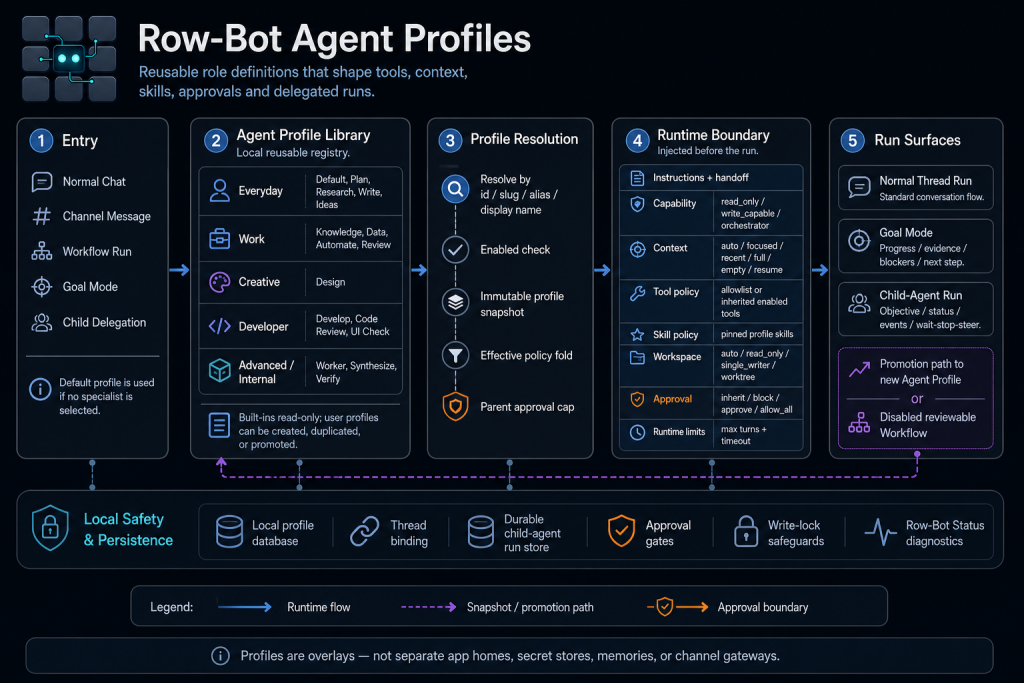
The diagram shows the Agent Profiles lifecycle as a left-to-right pipeline:
- Entry
- Agent Profile Library
- Profile Resolution
- Runtime Boundary
- Run Surfaces
Underneath this pipeline is a Local Safety & Persistence layer that handles storage, bindings, durable agent runs, approval gates, write-lock safeguards, and diagnostics.
This means profiles are not just prompt fragments.
They are part of the execution system.
1. Entry
The first stage is entry.
A Row-Bot run can begin from several places:
- Normal Chat
- Channel Message
- Workflow Run
- Goal Mode
- Child Delegation
If no specialist profile is selected, Row-Bot uses the default profile.
This matters because not every run needs a specialist.
A normal conversation can use the default.
But when the user asks for specialised work, Row-Bot can select or receive a more focused profile.
Examples:
- “Use a research agent to compare these tools.”
- “Spawn a review agent to critique this article.”
- “Use a developer agent to inspect this repo.”
- “Delegate the data cleaning plan to a worker.”
- “Run this as a goal and track progress.”
The entry point influences which profile is selected and what runtime constraints apply.
2. Agent Profile Library
The Agent Profile Library is the local registry of reusable profiles.
The diagram groups profiles into categories:
Everyday profiles
- Default
- Plan
- Research
- Write
- Ideas
Work profiles
- Knowledge
- Data
- Automate
- Review
Creative profiles
- Design
Developer profiles
- Develop
- Code Review
- UI Check
Advanced or internal profiles
- Worker
- Synthesize
- Verify
Built-in profiles are read-only.
User profiles can be created, duplicated, or promoted from successful runs.
That gives Row-Bot a controlled path for adapting to recurring workflows.
If a certain type of delegated task works well, the user can promote it into a reusable profile.
This turns one-off agent behaviour into reusable infrastructure.
Built-in profiles versus user profiles
Built-in profiles provide safe defaults.
They cover common roles like research, writing, planning, development, review, and verification.
Because they are built in, they are read-only.
User profiles are different.
A user can create or duplicate a profile to fit their own workflow.
For example:
- “Technical Blog Writer”
- “Strict Code Reviewer”
- “SEO Research Agent”
- “Launch Plan Reviewer”
- “Customer Email Drafter”
- “Product Spec Critic”
- “Security-Focused Developer”
The value is that behaviour becomes reusable.
Instead of re-explaining the role every time, the user can select a profile.
3. Profile Resolution
When a run starts, Row-Bot resolves the selected profile.
The diagram shows several resolution steps:
- Resolve by id, slug, alias, or display name
- Check whether the profile is enabled
- Create an immutable profile snapshot
- Fold effective policy
- Apply parent approval cap
This is important because agent runs need stable behaviour.
If a profile changes while a run is executing, the run should not suddenly mutate underneath it.
That is why the system creates an immutable snapshot.
The run uses the profile definition as it existed when the run started.
This makes execution more auditable and reproducible.
Why immutable snapshots matter
Imagine a child agent starts with a read-only review profile.
Halfway through, the profile is edited to become write-capable.
Without snapshots, the running agent might suddenly gain more permission.
That would be unsafe.
With immutable snapshots, the active run keeps the original boundary.
Changes affect future runs, not existing ones.
This is a small design detail, but it matters for safety.
Agent profiles are part of the permission system, so they need stable runtime semantics.
Effective policy folding
Profile resolution also folds effective policy.
A profile may define its own settings, but it still exists inside a parent context.
For example:
- A parent thread may require approval for certain actions.
- A task may run in block mode.
- A goal run may have its own constraints.
- A child agent may inherit restrictions from the parent.
- A workspace may have an active write lock.
The effective policy is the result after combining:
- Profile configuration
- Parent constraints
- Tool availability
- Workspace policy
- Approval policy
- Runtime safety settings
The profile cannot simply override everything.
That is what makes the system composable.
Parent approval cap
The diagram highlights the parent approval cap with an orange shield.
This means a child or delegated agent cannot exceed the approval permissions of the parent context.
For example:
If the parent run requires approvals, the child agent cannot silently switch to allow_all.
If the parent blocks destructive actions, the child cannot bypass that by using a permissive profile.
This prevents privilege escalation through delegation.
A profile can narrow permissions.
It should not be able to secretly widen them beyond the parent boundary.
4. Runtime Boundary
After resolution, Row-Bot builds the runtime boundary.
This is the most important part of the architecture.
The runtime boundary defines the effective environment for the run.
It includes:
- Instructions and handoff
- Capability
- Context
- Tool policy
- Skill policy
- Workspace
- Approval
- Runtime limits
This is why Agent Profiles are more than “roles”.
They define an execution envelope.
Instructions and handoff
A profile can inject role-specific instructions.
For example:
A research profile may say:
- Gather sources
- Compare findings
- Cite URLs
- Separate evidence from interpretation
- Report uncertainty
A review profile may say:
- Critique independently
- Look for gaps
- Identify risks
- Avoid rewriting unless asked
- Summarise actionable changes
A developer profile may say:
- Inspect files before editing
- Use the correct shell
- Run tests when appropriate
- Minimise changes
- Report touched files
The handoff instructions matter when child agents are used.
A delegated agent needs to understand its objective, expected output, context scope, and whether it should create artifacts or return findings.
Capability modes
The profile defines capability.
The diagram lists:
- read_only
- write_capable
- orchestrator
A read-only profile can inspect and report.
A write-capable profile can modify files or create artifacts when allowed.
An orchestrator profile can coordinate more complex workflows.
This is a useful separation.
A review agent should often be read-only.
A developer agent may need write capability.
An orchestration agent may need to break work into parts and coordinate agents or tools.
Capability should be explicit.
Context modes
Profiles can also define context mode.
The diagram lists:
- auto
- focused
- recent
- full
- empty
- resume
This controls how much context the run receives.
That matters a lot for delegation.
A child agent does not always need the entire parent thread.
In fact, too much context can make it worse.
A focused context packet is often better.
For example:
- A review agent may only need the draft and criteria.
- A research agent may need the research question and constraints.
- A developer agent may need the relevant files and objective.
- A verify agent may need the claimed result and evidence.
- A synthesize agent may need outputs from several children.
Context mode is one of the most important parts of making agents reliable.
Tool policy
Profiles define tool policy.
The diagram shows:
- Allowlist
- Inherited enabled tools
A profile can either inherit the tools available in the parent context or restrict itself to a selected allowlist.
This is useful for least privilege.
A review profile may only need document and search tools.
A developer profile may need filesystem and shell tools.
A research profile may need web search and reading tools.
A write profile may not need shell access at all.
Tool scoping reduces risk and keeps agent behaviour focused.
Skill policy
Profiles can pin profile-specific skills.
For example:
- Research profile can pin Deep Research
- Write profile can pin Humanizer or writing skills
- Data profile can pin Data Analyst
- Design profile can pin Design Creator
- Automate profile can pin Task Automation
- Review profile can pin critique or verification skills
This means profiles can compose with the skills system.
The profile selects the role and runtime boundary.
The skills provide workflow-specific instructions.
This keeps behaviour modular.
Workspace modes
Profiles can define workspace mode.
The diagram lists:
- auto
- read_only
- single_writer
- worktree
This matters for development and file-editing workflows.
A read-only agent can inspect files but not change them.
A single-writer profile can avoid conflicting edits.
A worktree profile can isolate changes into a separate working tree.
Write-lock safeguards help prevent multiple agents from editing the same workspace at the same time.
This is essential once agents can run in parallel or be delegated.
Without write locks, two agents could overwrite each other’s changes.
Approval modes
Approval mode is highlighted in orange in the diagram.
The listed modes are:
- inherit
- block
- approve
- allow_all
Approval policy defines how sensitive actions are handled.
For example:
- inherit follows the parent context
- block prevents certain actions
- approve asks the user before proceeding
- allow_all allows actions when policy permits
The key detail is that parent approval caps still apply.
A profile cannot use allow_all to escape a stricter parent run.
Approval is part of the safety boundary.
Runtime limits
Profiles can define runtime limits such as:
- Max turns
- Timeout
This prevents delegated agents from running indefinitely.
It also helps keep background work bounded.
A research child agent might get a longer timeout.
A quick review agent might get fewer turns.
A verification agent might be short and strict.
Runtime limits make agents more predictable.
5. Run Surfaces
Once the runtime boundary is assembled, the profile can execute in several run surfaces.
The diagram lists:
- Normal Thread Run
- Goal Mode
- Child-Agent Run
Each surface has a different interaction pattern.
Normal Thread Run
A normal thread run is the standard conversation flow.
The profile shapes how the assistant behaves in that thread.
For example:
- A write profile can focus on drafting and editing.
- A research profile can focus on source-backed answers.
- A data profile can focus on analysis.
- A design profile can guide design generation and critique.
This is the simplest use of profiles.
Goal Mode
Goal Mode is for larger tasks.
It tracks:
- Progress
- Evidence
- Blockers
- Next step
A profile can shape how the goal is executed.
For example:
A research goal might use a research profile.
A code implementation goal might use a develop profile.
A QA goal might use a review or verify profile.
This gives long-running work a structured lifecycle.
The user can see what is happening, what has been completed, and what remains blocked.
Child-Agent Run
Child-agent runs are where profiles become especially powerful.
A parent agent can delegate focused work to a child agent with a selected profile.
For example:
- Research agent gathers background sources
- Review agent critiques a draft
- Verify agent checks claims
- Developer agent inspects a bug
- Worker agent performs scoped exploration
- Synthesize agent merges child results
The child run has:
- Objective
- Status
- Events
- Wait, stop, and steer controls
This makes delegation explicit and trackable.
The parent can wait for results, inspect status, steer the child, or stop it if it becomes obsolete.
Promotion path
The diagram also shows a promotion path.
A successful run can be promoted into:
- A new Agent Profile
- A disabled reviewable workflow
This is a strong pattern.
Instead of manually designing every profile upfront, users can discover useful agent behaviours through real work.
If a delegated run works well, the user can turn it into a reusable profile.
If a sequence of steps becomes repeatable, it can become a workflow.
The important detail is that promotion is reviewable and controlled.
A run does not silently become a permanent agent definition.
The user chooses to promote it.
Local Safety & Persistence
Under the main flow is the Local Safety & Persistence layer.
It includes:
- Local profile database
- Thread binding
- Durable child-agent run store
- Approval gates
- Write-lock safeguards
- Row-Bot Status diagnostics
This layer makes profiles durable, inspectable, and safe.
Profiles live locally.
Child-agent runs are stored durably.
Thread bindings keep the correct profile attached to the correct run.
Approval gates enforce user control.
Write locks protect workspaces.
Diagnostics help explain what is running and why.
This is what turns agent profiles from a prompt trick into a runtime system.
Profiles are overlays
The diagram includes an important note:
Profiles are overlays, not separate app homes, secret stores, memories, or channel gateways.
This is a useful mental model.
An Agent Profile does not create a separate assistant with its own hidden memory or private tools.
It overlays behaviour and policy on top of the existing Row-Bot runtime.
That prevents confusion.
It also prevents profiles from becoming a way to hide state or bypass controls.
A profile shapes a run.
It does not create a new trust domain.
Example: using a research profile
Suppose the user says:
Use a research agent to compare local-first AI assistants.
The flow might look like this:
- Entry starts from normal chat or delegation.
- Row-Bot selects the Research profile.
- The profile is resolved by slug or display name.
- The enabled check passes.
- An immutable snapshot is created.
- Effective policy is folded with parent restrictions.
- A focused context mode is used.
- Web and reading tools may be available if allowed.
- Research-specific skills may be pinned.
- The child agent runs and returns findings.
- The parent summarises the result.
The research agent gets enough context to do the job, but not necessarily the entire parent thread.
That improves focus and safety.
Example: using a review profile
Suppose the user says:
Spawn a review agent to critique this article independently.
A review profile might be:
- Read-only
- Focused context
- No write access
- Limited tools
- Review-specific instructions
- Short runtime limit
This is useful because an independent review agent should not rewrite the document unless asked.
It should critique, identify issues, and return evidence.
The profile makes that boundary explicit.
Example: using a developer profile
Suppose the user says:
Use a developer agent to inspect this bug and propose a fix.
A developer profile may need:
- Filesystem access
- Shell access
- Focused repo context
- Write-capable workspace mode
- Approval gates for risky commands
- Runtime limits
- Developer skills
If the profile is write-capable, write-lock safeguards matter.
If tests or shell commands are needed, approval policy matters.
If multiple agents are running, workspace mode matters.
The profile defines all of that before execution.
Why child agents need profile boundaries
Delegation is powerful, but risky.
Without profile boundaries, a child agent might inherit too much:
- Too much context
- Too many tools
- Too much permission
- Too broad an objective
- Too little supervision
Profiles help fix that.
A child agent should receive:
- A clear objective
- A constrained context packet
- A suitable tool scope
- The right skill instructions
- A clear approval policy
- Runtime limits
- A durable status trail
This turns delegation into controlled parallel work rather than uncontrolled spawning.
Agent Profiles versus Skills
Agent Profiles and Skills are related, but they solve different problems.
A Skill is a reusable instruction pack for a workflow.
An Agent Profile is a reusable runtime boundary for a run.
A skill might say:
When doing deep research, use multiple sources and cite URLs.
A profile might say:
This run is a research agent with focused context, read-only workspace, selected tools, pinned research skills, inherited approvals, and a timeout.
Skills shape behaviour.
Profiles shape the whole execution envelope.
They work best together.
Agent Profiles versus Custom Tools
Custom Tools add executable capabilities.
Agent Profiles constrain and shape runs.
For example:
A custom SEO audit tool may inspect a website.
An SEO Research profile may define:
- Which tools are allowed
- How much context is passed
- Which skills are pinned
- Whether external actions need approval
- How results should be returned
Again, tools provide capability.
Profiles provide structure and boundaries.
Why this matters for safety
Agent Profiles are also a safety feature.
They support:
- Least-privilege tool access
- Read-only review agents
- Focused context sharing
- Approval inheritance
- Parent approval caps
- Runtime timeouts
- Workspace write locks
- Immutable profile snapshots
- Local run persistence
- Diagnostics
This reduces the risk of agent workflows becoming unpredictable.
A powerful agent does not need every tool and every permission for every task.
Profiles make the boundary explicit.
Why this matters for usability
Profiles also improve usability.
Users do not want to repeat:
Act as a careful research assistant. Use sources. Keep context focused. Do not edit files. Return a concise summary with citations.
They want to say:
Use the research profile.
Or:
Spawn a review agent.
Or:
Run this as a developer task.
Profiles make agent behaviour reusable and understandable.
They turn patterns into named roles.
Why this matters for scalability
As Row-Bot grows, the number of possible workflows increases.
There are chat workflows, task workflows, goal workflows, delegated workflows, developer workflows, design workflows, and background automations.
A single default agent configuration cannot fit all of them.
Agent Profiles provide a scaling mechanism.
They let Row-Bot support many agent behaviours without turning the base prompt into a giant mess.
This is especially useful when combined with:
- Skills
- Tool guides
- Context modes
- Memory retrieval
- Approval gates
- Task automation
- Goal mode
- Durable child-agent runs
Profiles become one of the organising layers of the agent runtime.
The developer takeaway
If you are building serious AI agents, reusable profiles are worth considering.
The key design ideas are:
- Treat profiles as runtime overlays, not just personas.
- Resolve profiles into immutable snapshots before execution.
- Fold parent policies into the effective runtime boundary.
- Apply parent approval caps to prevent privilege escalation.
- Scope tools by profile.
- Scope context by profile.
- Pin relevant skills by profile.
- Control workspace access by profile.
- Add runtime limits.
- Persist child-agent runs durably.
- Make promotion explicit and reviewable.
- Keep profiles local and inspectable.
This turns profiles into a real part of the agent operating system.
Final thoughts
The more capable AI agents become, the more important execution boundaries become.
A personal AI agent should not run every task with the same context, tools, skills, and approvals.
Research needs one mode.
Review needs another.
Development needs another.
Automation needs another.
Delegation needs another.
Row-Bot Agent Profiles are designed to make those modes reusable, local, inspectable, and safe.
They define how a run behaves, what tools it can use, what context it sees, what skills are active, what workspace access it has, and what approvals apply.
That is the difference between a generic assistant and an agent runtime.
The goal is simple:
Reusable agent roles, bounded execution, local persistence, and user-controlled delegation.
That is how Row-Bot approaches serious personal AI workflows.
Links
Row-Bot GitHub repository:
https://github.com/siddsachar/row-bot
Row-Bot website:
Row-Bot GitHub discussions:
https://github.com/siddsachar/row-bot/discussions
Related concept: local-first AI agents and personal AI sovereignty
Leave a Reply